
TabLayoutNiubility
Android自定义控件之RecyclerView打造万能ViewPager TabLayout(仿今日头条Tab滑动、Tab多布局、indicator蠕动、自定义indicator、文字颜色渐变)
Install / Use
npx skills add AnJiaoDe/TabLayoutNiubilityInstalls into whichever agent you are using.
README
文章目录
GitHub:https://github.com/AnJiaoDe/TabLayoutNiubility
CSDN:https://blog.csdn.net/confusing_awakening/article/details/107635695
该轮子特异功能如下:
使用方法
注意:该轮子适用于androidx中的ViewPager2和ViewPager
注意:如果轮子死活下载不下来,说明maven地址有毛病,你需要找到jitpack的官网首页,查看最新的官网地址
注意:记得去gayhub查看最新版本,最新版本最niubility
详细使用如下
Tab均分不滑动(ViewPager、ViewPager2均支持)
Tab滑动、 indicator蠕动、多布局(ViewPager、ViewPager2均支持)
根据item个数动态设置Tab均分还是滑动
Tab文字颜色渐变(ViewPager、ViewPager2均支持)
自定义Indicator如三角形(ViewPager、ViewPager2均支持)
ViewPager双层嵌套(建议不要使用ViewPager2进行双层嵌套,ViewPager2嵌套滑动冲突几乎无法处理,贼鸡儿坑)
仿微信主页Tab
相关API
TabMediator
FragmentPageAdapter
TabAdapter
TabLayoutScroll、TabLayoutNoScroll、TabLayoutMulti、IndicatorLineView 、 IndicatorTriangleView
TabLayoutScroll和 indicator style设置
自定义indicator
实现原理剖析
说真的,这自定义控件还真不简单
涉及到的难点场景
搞清楚ViewPager监听的onPageSelected、onPageScrolled和onPageScrollStateChanged回调执行特点
自定义HorizontalRecyclerView实现TabLayout
源码如下
TabLayout的item宽度均分
RecyclerView的item刷新如何做到不闪烁
UML类图如下
面向接口编程(面向多态编程)的思想
GitHub:https://github.com/AnJiaoDe/TabLayoutNiubility
CSDN:https://blog.csdn.net/confusing_awakening/article/details/107635695
该轮子特异功能如下:
Tab均分不滑动(ViewPager、ViewPager2均支持)
Tab滑动、 indicator蠕动、多布局(ViewPager、ViewPager2均支持)
根据item个数动态设置Tab均分还是滑动
Tab文字颜色渐变(ViewPager、ViewPager2均支持)
自定义Indicator如三角形(ViewPager、ViewPager2均支持)
ViewPager双层嵌套(建议不要使用ViewPager2进行双层嵌套,ViewPager2嵌套滑动冲突几乎无法处理,贼鸡儿坑)
仿微信主页Tab
使用方法
注意:该轮子适用于androidx中的ViewPager2和ViewPager
1.工程目录下的build.gradle中添加代码:
注意:如果轮子死活下载不下来,说明maven地址有毛病,你需要找到jitpack的官网首页,查看最新的官网地址
allprojects {
		repositories {
			        maven { url 'https://www.jitpack.io' }
		}
	}
2.直接在需要使用的模块的build.gradle中添加代码:
dependencies {
api 'com.github.AnJiaoDe:TabLayoutNiubility:V1.3.1'
}
注意:记得去gayhub查看最新版本,最新版本最niubility
3.如果你想使用ViewPager2,那么添加代码:
api 'androidx.viewpager2:viewpager2:1.0.0'//版本必须>=1.0.0
4.混淆已配置到库内部,无需做混淆配置
详细使用如下
Tab均分不滑动(ViewPager、ViewPager2均支持)
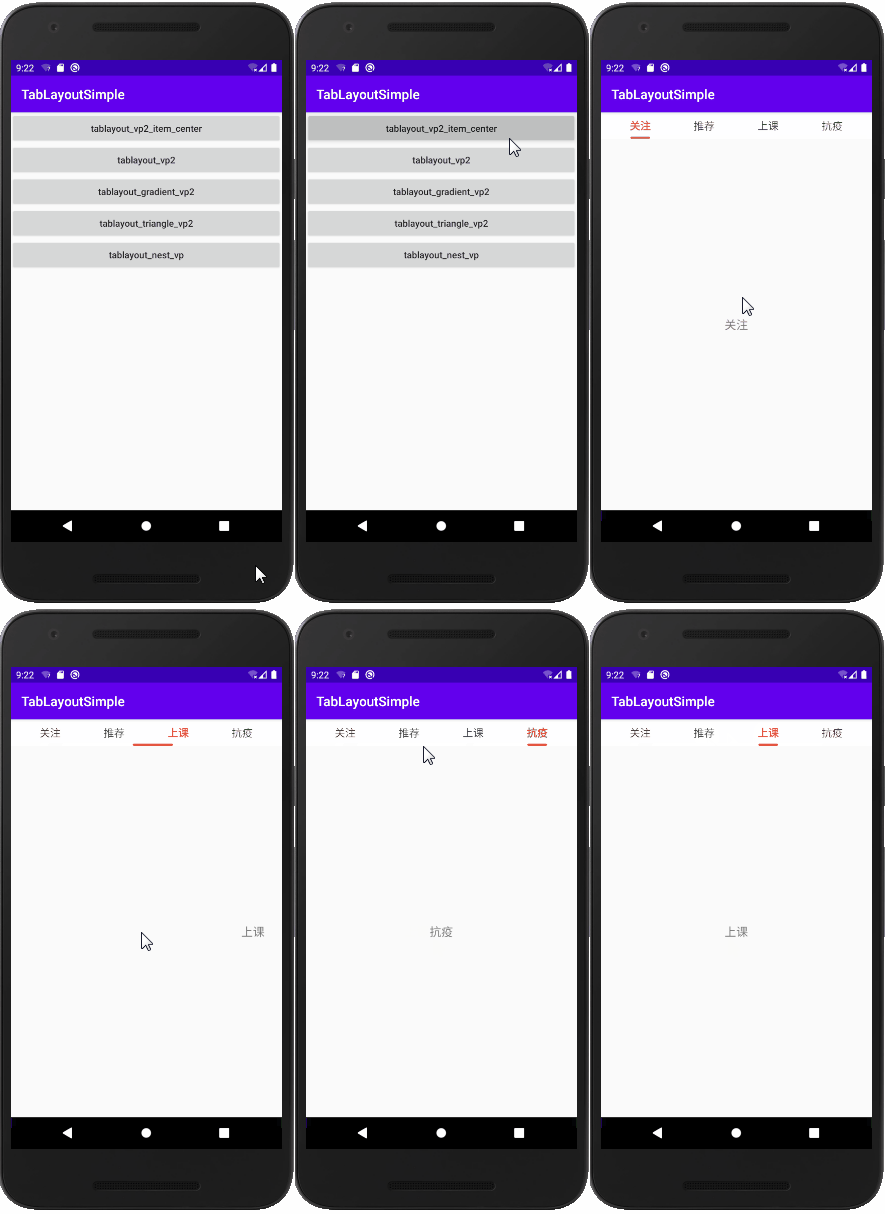 activity布局:
<?xml version="1.0" encoding="utf-8"?>
<LinearLayout xmlns:android="http://schemas.android.com/apk/res/android"
    xmlns:app="http://schemas.android.com/apk/res-auto"
    android:layout_width="match_parent"
    android:layout_height="match_parent"
    android:orientation="vertical">

    <com.cy.tablayoutniubility.TabLayoutNoScroll
        android:id="@+id/tablayout"
        android:layout_width="match_parent"
        android:layout_height="40dp"
        app:space_horizontal="0dp"
        android:background="#fff">

        <com.cy.tablayoutniubility.IndicatorLineView
            android:layout_width="match_parent"
            app:width_indicator_max="80dp"
            app:width_indicator_selected="30dp"
            android:layout_height="wrap_content" />
    </com.cy.tablayoutniubility.TabLayoutNoScroll>

    <androidx.viewpager2.widget.ViewPager2
        android:id="@+id/view_pager"
        android:layout_width="match_parent"
        android:layout_height="match_parent"
        android:overScrollMode="never" />
</LinearLayout>
tab_item布局:
<?xml version="1.0" encoding="utf-8"?>
<TextView xmlns:android="http://schemas.android.com/apk/res/android"
    android:id="@+id/tv"
    android:layout_width="wrap_content"
    android:layout_height="wrap_content"
    android:gravity="center"
    android:textColor="#444444"
    android:textSize="16sp" >
</TextView>
JAVA代码:
    ViewPager2 viewPager2 = findViewById(R.id.view_pager);
        TabLayoutNoScroll tabLayoutLine = findViewById(R.id.tablayout);
//        tabLayoutLine.setSpace_horizontal(0).setSpace_vertical(0);
        FragPageAdapterVp2NoScroll<String> fragmentPageAdapter = new FragPageAdapterVp2NoScroll<String>(this) {
            @Override
            public Fragment createFragment(String bean, int position) {
                return FragmentTab2.newInstance(FragmentTab2.TAB_NAME2, getList_bean().get(position));
            }

            @Override
            public void bindDataToTab(TabNoScrollViewHolder holder, int position, String bean, boolean isSelected) {
                TextView textView = holder.getView(R.id.tv);
                if (isSelected) {
                    textView.setTextColor(0xffe45540);
                    textView.setTypeface(Typeface.defaultFromStyle(Typeface.BOLD));
                } else {
                    textView.setTextColor(0xff444444);
                    textView.setTypeface(Typeface.defaultFromStyle(Typeface.NORMAL));
                }
                textView.setText(bean);
            }

            @Override
            public int getTabLayoutID(int position, String bean) {
                return R.layout.item_tab_center;
            }
        };

        TabAdapterNoScroll<String> tabAdapter = new TabMediatorVp2NoScroll<String>(tabLayoutLine, viewPager2).setAdapter(fragmentPageAdapter);

        List<String> list = new ArrayList<>();
        list.add("关注");
        list.add("推荐");
        list.add("上课");
        list.add("抗疫");
        fragmentPageAdapter.add(list);
        tabAdapter.add(list);
Tab滑动、 indicator蠕动、多布局(ViewPager、ViewPager2均支持)
多布局:
            @Override
            public int getTabLayoutID(int position, String bean) {
                if (position == 0) {
                    return R.layout.item_tab_msg;
                }
                return R.layout.item_tab;
            }
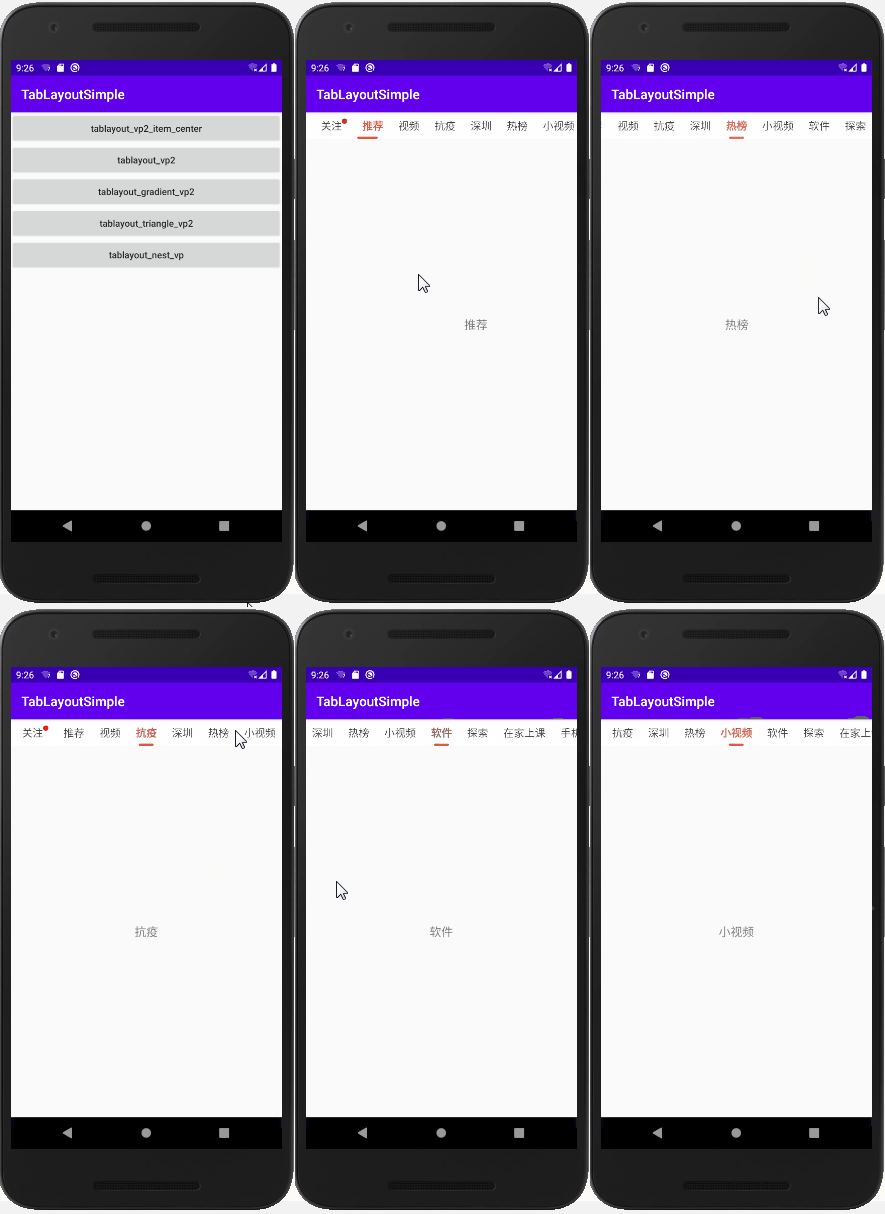 activity布局:
<?xml version="1.0" encoding="utf-8"?>
<LinearLayout xmlns:android="http://schemas.android.com/apk/res/android"
    xmlns:app="http://schemas.android.com/apk/res-auto"
    android:layout_width="match_parent"
    android:layout_height="match_parent"
    android:orientation="vertical">

    <com.cy.tablayoutniubility.TabLayoutScroll
        android:id="@+id/tablayout"
        android:layout_width="match_parent"
        android:layout_height="40dp"
        android:background="#fff">

        <com.cy.tablayoutniubility.IndicatorLineView
            android:layout_width="match_parent"
            android:layout_height="wrap_content" />
    </com.cy.tablayoutniubility.TabLayoutScroll>

    <androidx.viewpager2.widget.ViewPager2
        android:id="@+id/view_pager"
        android:layout_width="match_parent"
        android:layout_height="match_parent"
        android:overScrollMode="never" />
</LinearLayout>
tab item布局:
<?xml version="1.0" encoding="utf-8"?>
<TextView xmlns:android="http://schemas.android.com/apk/res/android"
    android:layout_width="wrap_content"
    android:layout_height="match_parent"
    android:gravity="center"
    android:textSize="16sp"
    android:textColor="#444444"
    android:id="@+id/tv">

</TextView>
JAVA代码:
   ViewPager2 viewPager2 = findViewById(R.id.view_pager);
        TabLayoutScroll tabLayoutLine = findViewById(R.id.tablayout);
//        tabLayoutLine.setSpace_horizontal(dpAdapt(20)).setSpace_vertical(dpAdapt(8));
        FragPageAdapterVp2<String> fragmentPageAdapter = new FragPageAdapterVp2<String>(this) {

            @Override
            public Fragment createFragment(String bean, int position) {
                return FragmentTab2.newInstance(FragmentTab2.TAB_NAME2, getList_bean().get(position));
            }

            @Override
            public void bindDataToTab(TabViewHolder holder, int position, String bean, boolean isSelected) {
                TextView textView = holder.getView(R.id.tv);
                if (isSelected) {
                    textView.setTextColor(0xffe45540);
                    textView.setTypeface(Typeface.defaultFromStyle(Typeface.BOLD));
                } else {
                    textView.setTextColor(0xff444444);
                    textView.setTypeface(Typeface.defaultFromStyle(Typeface.NORMAL));
                }
                textView.setText(bean);
            }

            @Override
            public int getTabLayoutID(int position, String bean) {
                if (position == 0) {
                    return R.layout.item_tab_msg;
                }
                return R.layout.item_tab;
            }
        };
        TabAdapter<String> tabAdapter = new TabMediatorVp2<String>(tabLayoutLine, viewPager2).setAdapter(fragmentPageAdapter);

        List<String> list = new ArrayList<>();
        list.add("关注");
        list.add("推荐");
        list.add("视频");
        list.add("抗疫");
        list.add("酷玩");
        list.add("彩票");
        list.add("漫画");
        fragmentPageAdapter.add(list);
        tabAdapter.add(list);
根据item个数动态设置Tab均分还是滑动
使用TabLayoutMulti
<?xml version="1.0" encoding="utf-8"?>
<LinearLayout xmlns:android="http://schemas.android.com/apk/res/android"
    xmlns:app="http://schemas.android.com/apk/res-auto"
    android:layout_width="match_parent"
    android:layout_height="match_parent"
    android:orientation="vertical">

    <com.cy.tablayoutniubility.TabLayoutMulti
        android:id="@+id/tablayout"
        android:layout_width="match_parent"
        android:layout_height="40dp"
        app:space_horizontal="0dp"
        android:background="#fff">

        <com.cy.tablayoutniubility.IndicatorLineView
            android:layout_width="match_parent"
            app:width_indicator_max="80dp"
            app:width_indicator_selected="30dp"
            android:layout_height="wrap_content" />
    </com.cy.tablayoutniubility.TabLayoutMulti>

    <androidx.viewpager2.widget.ViewPager2
        android:id="@+id/view_pager"
        android:layout_width="match_parent"
        android:layout_height="match_parent"
        android:overScrollMode="never" />
</LinearLayout>
JAVA代码:
ViewPager2 viewPager2 = findViewById(R.id.view_pager);
        TabLayoutMulti tabLayoutMulti = findViewById(R.id.tablayout);
//        tabLayoutLine.setSpac
Related Skills
node-connect
385.5kDiagnose OpenClaw Android, iOS, or macOS node pairing, QR/setup code, route, auth, and connection failures.
blender-python-addon
40.5kBlender Python add-on rules for operators, panels, properties, registration, testing, and API-safe scripting
flutter-development-guidelines-cursorrules-prompt-file
40.5kCursor rules for Flutter development with MVVM architecture, Riverpod state management, Material widgets, and Dart style guidelines.
commit-push-pr
140.7kCommit, push, and open a PR
