
TabLayoutNiubility
Android自定义控件之RecyclerView打造万能ViewPager TabLayout(仿今日头条Tab滑动、Tab多布局、indicator蠕动、自定义indicator、文字颜色渐变)
Install / Use
/learn @AnJiaoDe/TabLayoutNiubilityREADME
文章目录
GitHub:https://github.com/AnJiaoDe/TabLayoutNiubility
CSDN:https://blog.csdn.net/confusing_awakening/article/details/107635695
该轮子特异功能如下:
使用方法
注意:该轮子适用于androidx中的ViewPager2和ViewPager
注意:如果轮子死活下载不下来,说明maven地址有毛病,你需要找到jitpack的官网首页,查看最新的官网地址
注意:记得去gayhub查看最新版本,最新版本最niubility
详细使用如下
Tab均分不滑动(ViewPager、ViewPager2均支持)
Tab滑动、 indicator蠕动、多布局(ViewPager、ViewPager2均支持)
根据item个数动态设置Tab均分还是滑动
Tab文字颜色渐变(ViewPager、ViewPager2均支持)
自定义Indicator如三角形(ViewPager、ViewPager2均支持)
ViewPager双层嵌套(建议不要使用ViewPager2进行双层嵌套,ViewPager2嵌套滑动冲突几乎无法处理,贼鸡儿坑)
仿微信主页Tab
相关API
TabMediator
FragmentPageAdapter
TabAdapter
TabLayoutScroll、TabLayoutNoScroll、TabLayoutMulti、IndicatorLineView 、 IndicatorTriangleView
TabLayoutScroll和 indicator style设置
自定义indicator
实现原理剖析
说真的,这自定义控件还真不简单
涉及到的难点场景
搞清楚ViewPager监听的onPageSelected、onPageScrolled和onPageScrollStateChanged回调执行特点
自定义HorizontalRecyclerView实现TabLayout
源码如下
TabLayout的item宽度均分
RecyclerView的item刷新如何做到不闪烁
UML类图如下
面向接口编程(面向多态编程)的思想
GitHub:https://github.com/AnJiaoDe/TabLayoutNiubility
CSDN:https://blog.csdn.net/confusing_awakening/article/details/107635695
该轮子特异功能如下:
Tab均分不滑动(ViewPager、ViewPager2均支持)
Tab滑动、 indicator蠕动、多布局(ViewPager、ViewPager2均支持)
根据item个数动态设置Tab均分还是滑动
Tab文字颜色渐变(ViewPager、ViewPager2均支持)
自定义Indicator如三角形(ViewPager、ViewPager2均支持)
ViewPager双层嵌套(建议不要使用ViewPager2进行双层嵌套,ViewPager2嵌套滑动冲突几乎无法处理,贼鸡儿坑)
仿微信主页Tab
使用方法
注意:该轮子适用于androidx中的ViewPager2和ViewPager
1.工程目录下的build.gradle中添加代码:
注意:如果轮子死活下载不下来,说明maven地址有毛病,你需要找到jitpack的官网首页,查看最新的官网地址
allprojects {
		repositories {
			        maven { url 'https://www.jitpack.io' }
		}
	}
2.直接在需要使用的模块的build.gradle中添加代码:
dependencies {
api 'com.github.AnJiaoDe:TabLayoutNiubility:V1.3.1'
}
注意:记得去gayhub查看最新版本,最新版本最niubility
3.如果你想使用ViewPager2,那么添加代码:
api 'androidx.viewpager2:viewpager2:1.0.0'//版本必须>=1.0.0
4.混淆已配置到库内部,无需做混淆配置
详细使用如下
Tab均分不滑动(ViewPager、ViewPager2均支持)
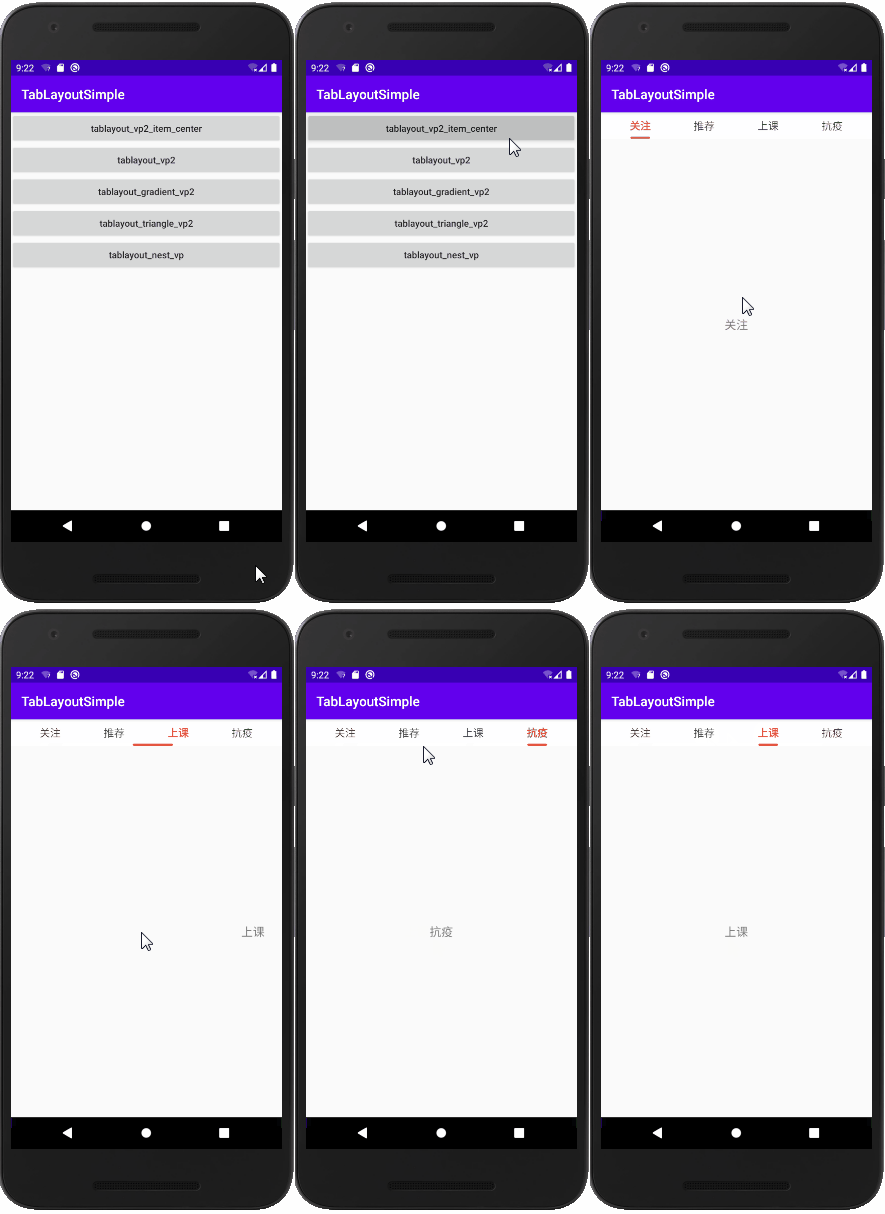 activity布局:
<?xml version="1.0" encoding="utf-8"?>
<LinearLayout xmlns:android="http://schemas.android.com/apk/res/android"
    xmlns:app="http://schemas.android.com/apk/res-auto"
    android:layout_width="match_parent"
    android:layout_height="match_parent"
    android:orientation="vertical">

    <com.cy.tablayoutniubility.TabLayoutNoScroll
        android:id="@+id/tablayout"
        android:layout_width="match_parent"
        android:layout_height="40dp"
        app:space_horizontal="0dp"
        android:background="#fff">

        <com.cy.tablayoutniubility.IndicatorLineView
            android:layout_width="match_parent"
            app:width_indicator_max="80dp"
            app:width_indicator_selected="30dp"
            android:layout_height="wrap_content" />
    </com.cy.tablayoutniubility.TabLayoutNoScroll>

    <androidx.viewpager2.widget.ViewPager2
        android:id="@+id/view_pager"
        android:layout_width="match_parent"
        android:layout_height="match_parent"
        android:overScrollMode="never" />
</LinearLayout>
tab_item布局:
<?xml version="1.0" encoding="utf-8"?>
<TextView xmlns:android="http://schemas.android.com/apk/res/android"
    android:id="@+id/tv"
    android:layout_width="wrap_content"
    android:layout_height="wrap_content"
    android:gravity="center"
    android:textColor="#444444"
    android:textSize="16sp" >
</TextView>
JAVA代码:
    ViewPager2 viewPager2 = findViewById(R.id.view_pager);
        TabLayoutNoScroll tabLayoutLine = findViewById(R.id.tablayout);
//        tabLayoutLine.setSpace_horizontal(0).setSpace_vertical(0);
        FragPageAdapterVp2NoScroll<String> fragmentPageAdapter = new FragPageAdapterVp2NoScroll<String>(this) {
            @Override
            public Fragment createFragment(String bean, int position) {
                return FragmentTab2.newInstance(FragmentTab2.TAB_NAME2, getList_bean().get(position));
            }

            @Override
            public void bindDataToTab(TabNoScrollViewHolder holder, int position, String bean, boolean isSelected) {
                TextView textView = holder.getView(R.id.tv);
                if (isSelected) {
                    textView.setTextColor(0xffe45540);
                    textView.setTypeface(Typeface.defaultFromStyle(Typeface.BOLD));
                } else {
                    textView.setTextColor(0xff444444);
                    textView.setTypeface(Typeface.defaultFromStyle(Typeface.NORMAL));
                }
                textView.setText(bean);
            }

            @Override
            public int getTabLayoutID(int position, String bean) {
                return R.layout.item_tab_center;
            }
        };

        TabAdapterNoScroll<String> tabAdapter = new TabMediatorVp2NoScroll<String>(tabLayoutLine, viewPager2).setAdapter(fragmentPageAdapter);

        List<String> list = new ArrayList<>();
        list.add("关注");
        list.add("推荐");
        list.add("上课");
        list.add("抗疫");
        fragmentPageAdapter.add(list);
        tabAdapter.add(list);
Tab滑动、 indicator蠕动、多布局(ViewPager、ViewPager2均支持)
多布局:
            @Override
            public int getTabLayoutID(int position, String bean) {
                if (position == 0) {
                    return R.layout.item_tab_msg;
                }
                return R.layout.item_tab;
            }
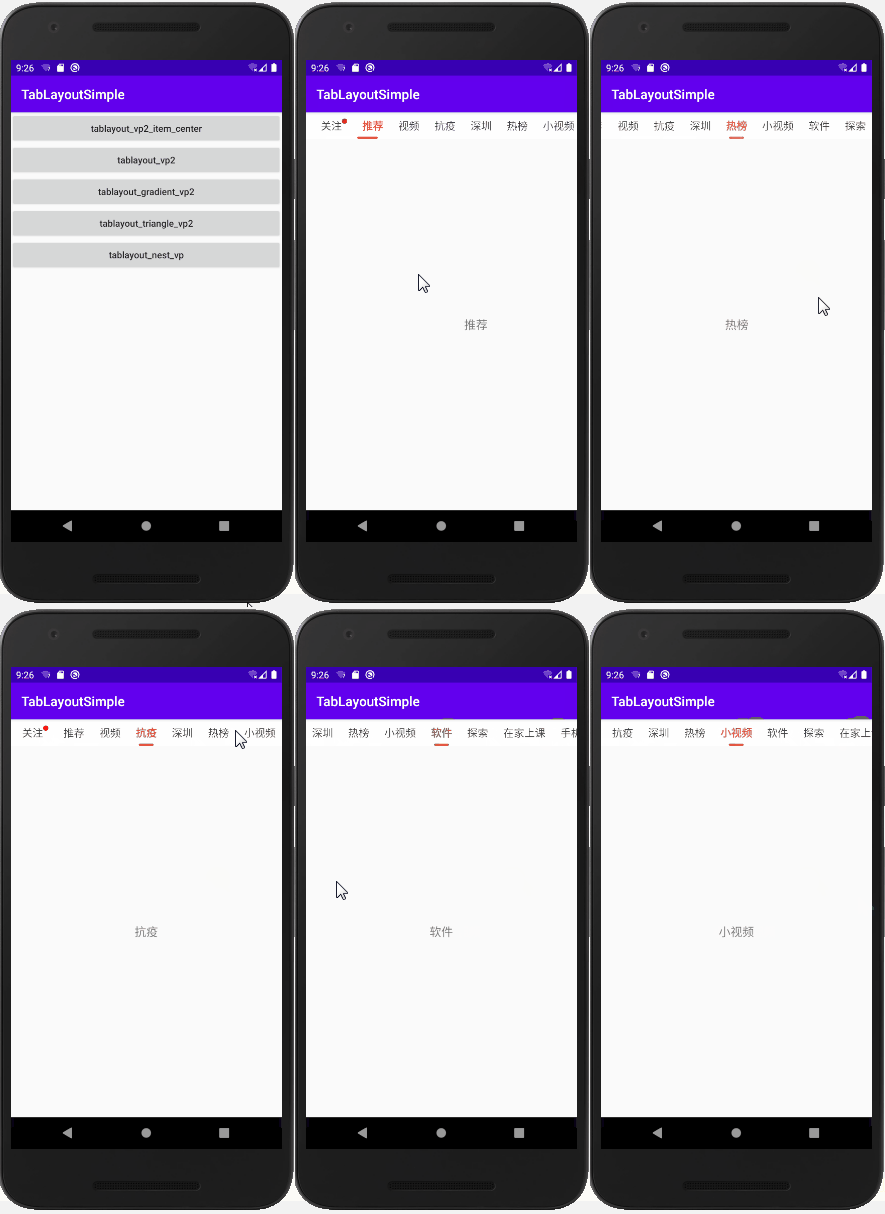 activity布局:
<?xml version="1.0" encoding="utf-8"?>
<LinearLayout xmlns:android="http://schemas.android.com/apk/res/android"
    xmlns:app="http://schemas.android.com/apk/res-auto"
    android:layout_width="match_parent"
    android:layout_height="match_parent"
    android:orientation="vertical">

    <com.cy.tablayoutniubility.TabLayoutScroll
        android:id="@+id/tablayout"
        android:layout_width="match_parent"
        android:layout_height="40dp"
        android:background="#fff">

        <com.cy.tablayoutniubility.IndicatorLineView
            android:layout_width="match_parent"
            android:layout_height="wrap_content" />
    </com.cy.tablayoutniubility.TabLayoutScroll>

    <androidx.viewpager2.widget.ViewPager2
        android:id="@+id/view_pager"
        android:layout_width="match_parent"
        android:layout_height="match_parent"
        android:overScrollMode="never" />
</LinearLayout>
tab item布局:
<?xml version="1.0" encoding="utf-8"?>
<TextView xmlns:android="http://schemas.android.com/apk/res/android"
    android:layout_width="wrap_content"
    android:layout_height="match_parent"
    android:gravity="center"
    android:textSize="16sp"
    android:textColor="#444444"
    android:id="@+id/tv">

</TextView>
JAVA代码:
   ViewPager2 viewPager2 = findViewById(R.id.view_pager);
        TabLayoutScroll tabLayoutLine = findViewById(R.id.tablayout);
//        tabLayoutLine.setSpace_horizontal(dpAdapt(20)).setSpace_vertical(dpAdapt(8));
        FragPageAdapterVp2<String> fragmentPageAdapter = new FragPageAdapterVp2<String>(this) {

            @Override
            public Fragment createFragment(String bean, int position) {
                return FragmentTab2.newInstance(FragmentTab2.TAB_NAME2, getList_bean().get(position));
            }

            @Override
            public void bindDataToTab(TabViewHolder holder, int position, String bean, boolean isSelected) {
                TextView textView = holder.getView(R.id.tv);
                if (isSelected) {
                    textView.setTextColor(0xffe45540);
                    textView.setTypeface(Typeface.defaultFromStyle(Typeface.BOLD));
                } else {
                    textView.setTextColor(0xff444444);
                    textView.setTypeface(Typeface.defaultFromStyle(Typeface.NORMAL));
                }
                textView.setText(bean);
            }

            @Override
            public int getTabLayoutID(int position, String bean) {
                if (position == 0) {
                    return R.layout.item_tab_msg;
                }
                return R.layout.item_tab;
            }
        };
        TabAdapter<String> tabAdapter = new TabMediatorVp2<String>(tabLayoutLine, viewPager2).setAdapter(fragmentPageAdapter);

        List<String> list = new ArrayList<>();
        list.add("关注");
        list.add("推荐");
        list.add("视频");
        list.add("抗疫");
        list.add("酷玩");
        list.add("彩票");
        list.add("漫画");
        fragmentPageAdapter.add(list);
        tabAdapter.add(list);
根据item个数动态设置Tab均分还是滑动
使用TabLayoutMulti
<?xml version="1.0" encoding="utf-8"?>
<LinearLayout xmlns:android="http://schemas.android.com/apk/res/android"
    xmlns:app="http://schemas.android.com/apk/res-auto"
    android:layout_width="match_parent"
    android:layout_height="match_parent"
    android:orientation="vertical">

    <com.cy.tablayoutniubility.TabLayoutMulti
        android:id="@+id/tablayout"
        android:layout_width="match_parent"
        android:layout_height="40dp"
        app:space_horizontal="0dp"
        android:background="#fff">

        <com.cy.tablayoutniubility.IndicatorLineView
            android:layout_width="match_parent"
            app:width_indicator_max="80dp"
            app:width_indicator_selected="30dp"
            android:layout_height="wrap_content" />
    </com.cy.tablayoutniubility.TabLayoutMulti>

    <androidx.viewpager2.widget.ViewPager2
        android:id="@+id/view_pager"
        android:layout_width="match_parent"
        android:layout_height="match_parent"
        android:overScrollMode="never" />
</LinearLayout>
JAVA代码:
ViewPager2 viewPager2 = findViewById(R.id.view_pager);
        TabLayoutMulti tabLayoutMulti = findViewById(R.id.tablayout);
//        tabLayoutLine.setSpac
Related Skills
node-connect
341.2kDiagnose OpenClaw node connection and pairing failures for Android, iOS, and macOS companion apps
frontend-design
84.5kCreate distinctive, production-grade frontend interfaces with high design quality. Use this skill when the user asks to build web components, pages, or applications. Generates creative, polished code that avoids generic AI aesthetics.
openai-whisper-api
341.2kTranscribe audio via OpenAI Audio Transcriptions API (Whisper).
commit-push-pr
84.5kCommit, push, and open a PR
