
crypto-quant-signal-mcp
AI trading brain for crypto perps — composite signals, funding rate arb scanning, and market regime detection via MCP
Install / Use
claude mcp add AlgoVaultLabs -- npx -y github:AlgoVaultLabs/crypto-quant-signal-mcpIf the server publishes to npm under a different name, use that package instead — check the repo README.
MCP Server
Model Context Protocol server
Quality Score
Category
Development & EngineeringSupported Platforms
Tags
Our assessment of crypto-quant-signal-mcp
crypto-quant-signal-mcp scores 78/100 on our quality scale, 3099th of 4,529 Development & Engineering skills we index.
Its MCP Server is 23 KB long, well organised into 12 sections with 1 code example: a thorough specification that gives an agent plenty to work with.
It has 10 GitHub stars, so there is little community track record yet; judge it on its content.
Maintenance, license and trust
- The repository was last updated today, so crypto-quant-signal-mcp is actively maintained.
- It is released under the MIT license, a permissive license that allows use, modification and commercial use with attribution.
- Its trust signals score 97/100, with no cautions. These come from repository metadata, not a code audit — read the skill file before letting an agent act on it.
Safety scan
No issues foundOur scan of the whole file found no instruction hijacking, hidden characters, credential access, data exfiltration or destructive commands.
Automated pattern scan on 2026-10-01. It catches known dangerous patterns, not every risk — read a skill before letting an agent act on it.
crypto-quant-signal-mcp compared with similar skills
All 4 of these similar skills score higher than crypto-quant-signal-mcp; compare them before choosing.
| Skill | Score | Stars | Updated | Format |
|---|---|---|---|---|
| crypto-quant-signal-mcp (this skill)by AlgoVaultLabs | 78 | 10 | today | MCP Server |
| Agent-Reachby Panniantong | 100 | 87.2k | 16d ago | CLAUDE.md |
| headroomby headroomlabs-ai | 100 | 74.2k | today | CLAUDE.md |
| rufloby ruvnet | 100 | 73.6k | today | CLAUDE.md |
| CowAgentby zhayujie | 100 | 47.2k | today | CLAUDE.md |
Frequently asked questions
- How do I install crypto-quant-signal-mcp?
- Run
claude mcp add AlgoVaultLabs -- npx -y github:AlgoVaultLabs/crypto-quant-signal-mcp. The install tabs above show the steps for each supported agent. - Which AI agents does crypto-quant-signal-mcp work with?
- It is written for Claude Code and Claude Desktop, as a MCP Server file. Other agents that read the same format can often use it too.
- Is crypto-quant-signal-mcp safe to use?
- Our scan of the whole file found no instruction hijacking, hidden characters, credential access, data exfiltration or destructive commands. It is MIT-licensed and scores 97/100 on trust signals. Skills are instructions an agent will follow, so read the file before installing it and do not approve commands you do not understand.
- Is crypto-quant-signal-mcp still maintained?
- The repository was last updated today, so crypto-quant-signal-mcp is actively maintained.
Skill content
View source on GitHubQuick start (30 seconds)
No code. No API key. No install. The server speaks Streamable HTTP at https://api.algovault.com/mcp — any Model Context Protocol client connects directly.
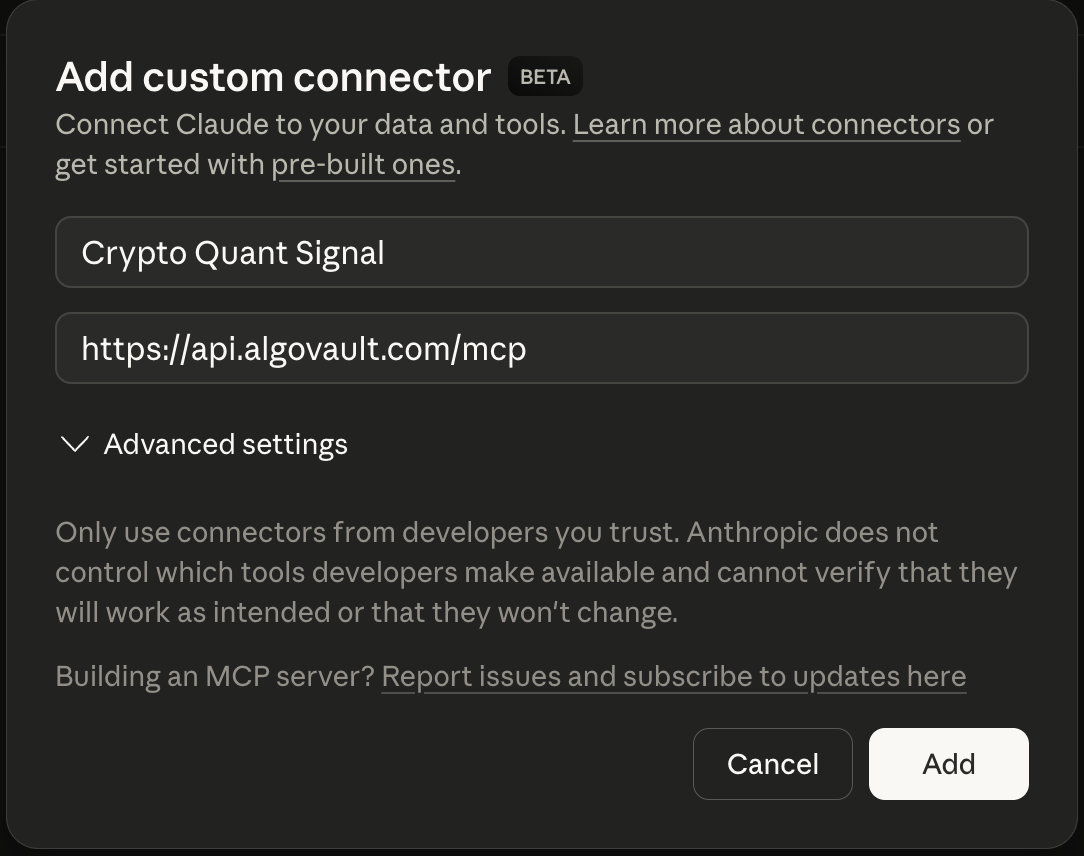
1. Add the connector. In Claude → Settings → Connectors → Add custom connector:
| Field | Value |
|---|---|
| Name | Crypto Quant Signal |
| URL | https://api.algovault.com/mcp |
2. Ask for a call. In plain language:
"Get me a trade call for ETH on the 4h timeframe"
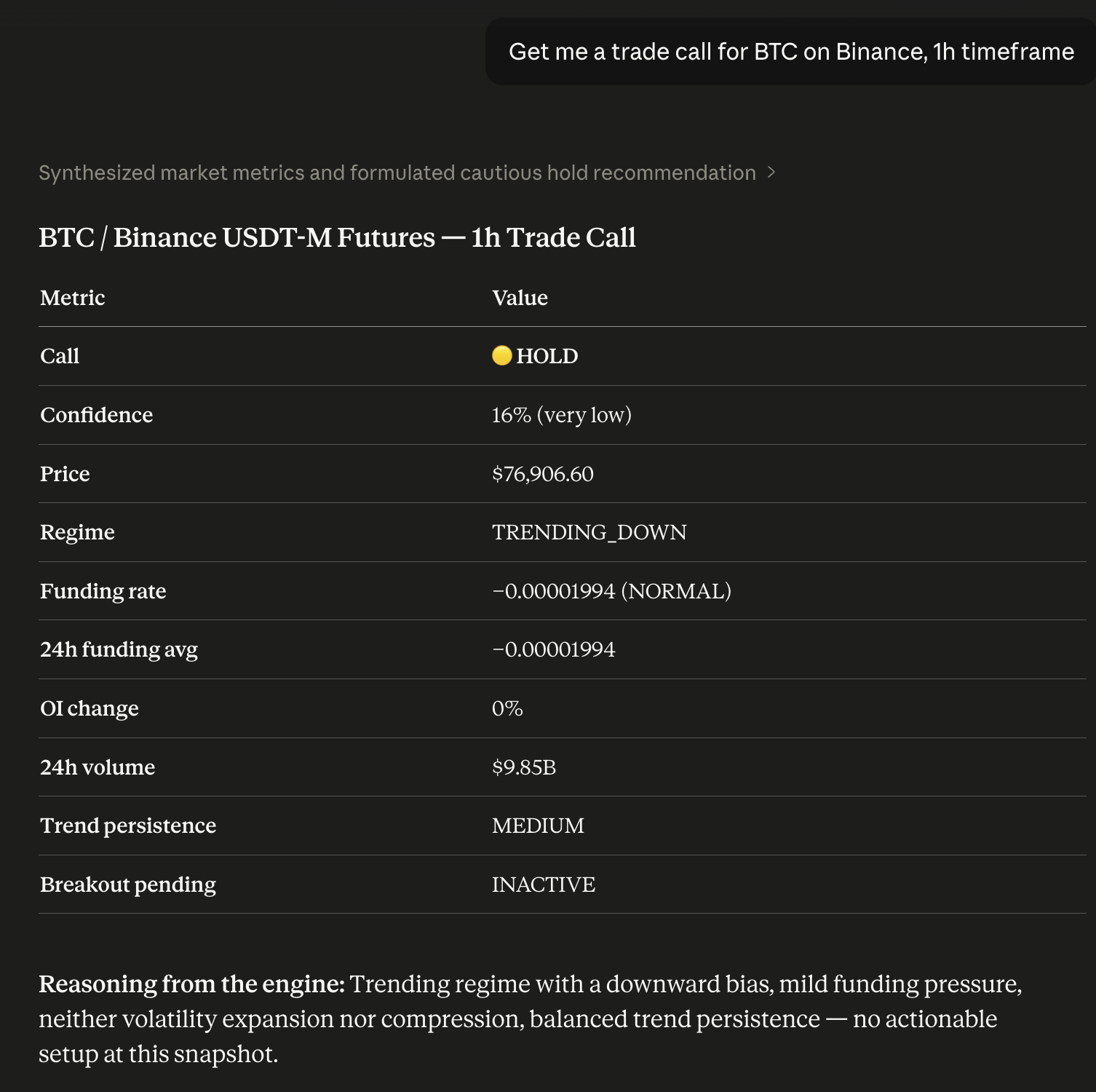
Your Claude now has a quant analyst built in. Prefer local? Run npx -y crypto-quant-signal-mcp.
Running locally on npm 12+? npm v12 disables dependency install scripts by default. AlgoVault's optional local SQLite mode uses the native
better-sqlite3module — if you install it into a project, runnpm approve-scripts(ornpm install --allow-scripts) to build it. The hosted HTTP transport (api.algovault.com/mcp) needs no local build.
What one call returns
One API call. One verdict. Not 8 raw indicators. get_trade_call returns a directional BUY / SELL / HOLD with a confidence score and the detected market regime — a composite verdict, not a data dump for your agent to interpret.
Under the hood, a self-tuning model fuses momentum, trend structure, derivatives positioning, open interest, and volume into one weighted call. Every call reports market regime — trending, ranging, or volatile — alongside direction and confidence. Directional calls fire only when conviction clears the threshold; roughly 99% of evaluations return HOLD.
{
  "call": "BUY",
  "confidence": 78,
  "price": 84250.50,
  "indicators": {
    "funding_rate": 0.0001,
    "funding_24h_avg": 0.00008,
    "funding_state": "NORMAL",
    "oi_change_pct": 2.4,
    "volume_24h": 2381602633,
    "trend_persistence": "HIGH",
    "breakout_pending": "INACTIVE"
  },
  "regime": "TRENDING_UP",
  "reasoning": "Trending regime, upward bias. Funding pressure mild. Volatility neither expanding nor compressed. Trend persistence elevated; momentum structure. Strong conviction from aligned signals.",
  "timestamp": 1712764800,
  "coin": "BTC",
  "timeframe": "1h",
  "also_see": [
    { "coin": "ETH", "timeframe": "1h", "confidence": 82 },
    { "coin": "SOL", "timeframe": "15m", "confidence": 73 }
  ],
  "_algovault": {
    "version": "1.30.0",
    "tool": "get_trade_call",
    "compatible_with": []
  }
}
The _algovault block is the envelope every tool response carries: the server version, the tool that answered, your quota, and compatible_with — the companion packages that accept this object directly. It projects from a machine-verified registry, so it lists a package only once that package is published and runnable. It is [] today, and that is the truthful answer: there is no companion package yet.
Live, verifiable track record
<!-- SoT: this README is the single canonical source. The data-tr-field numbers below are auto-injected from live /api/performance-public + /api/merkle-batches by scripts/snapshot-landing-data.mjs at npm-publish + Hetzner-deploy. Do NOT hand-edit the numbers; edit "What's new" by hand. Wired by OPS-NPM-README-SINGLE-SOT-W1 (2026-05-31). --> <p align="center"> <strong><span data-tr-field="pfe_wr">90.9%</span> PFE Win Rate</strong> · <strong><span data-tr-field="total_calls">914,181</span> trade calls</strong> · <strong><span data-tr-field="merkle_batches">174</span> on-chain batches</strong> <!-- SNAPSHOT-LINE --> </p> <p align="center"> Every call is hashed at emission and anchored on <a href="https://docs.base.org">Base L2</a> in daily Merkle batches. We cannot edit history. </p>The full record is public and on-chain — no cherry-picking, no survivorship bias:
- Live dashboard — algovault.com/track-record
- Merkle batch verifier — algovault.com/verify
- Anchor contract on Base L2 —
0x6485…0f81 - All batches (raw JSON) — api.algovault.com/api/merkle-batches
AlgoVault is also a verified agent on the ERC-8004 Identity Registry (Base L2), agentId 44544 — a portable, on-chain handle AI orchestrators can resolve.
Works with your stack
AlgoVault is drop-in for every MCP-spec client, every major agent framework, and every official exchange Agent Trade Kit — no SDK, no wrapper. It serves Streamable HTTP at https://api.algovault.com/mcp; tools/list + resources/list is the API surface.
MCP clients.
| Client | Config |
|---|---|
| Claude Desktop | Settings → Connectors → Add custom connector → https://api.algovault.com/mcp |
| Claude Code (CLI) | claude mcp add crypto-quant-signal https://api.algovault.com/mcp |
| Cursor | ~/.cursor/config.json → mcpServers block → url: "https://api.algovault.com/mcp" |
| Cline | VS Code Cline extension → MCP server settings → add Streamable HTTP server |
| Codex (OpenAI CLI) | ~/.codex/config.toml → [mcp_servers.algovault] table + url = "https://api.algovault.com/mcp" (or codex mcp CLI) |
| Windsurf | ~/.codeium/windsurf/mcp_config.json → mcpServers.algovault.serverUrl = "https://api.algovault.com/mcp" |
| Continue.dev | config.yaml → mcpServers: [{ name: algovault, type: streamable-http, url: "https://api.algovault.com/mcp" }] |
| Any other MCP-spec-compliant client | Configure the Streamable HTTP transport with URL https://api.algovault.com/mcp |
Agent plugin hosts. The npm package ships plugin.json, mcp.json and .cursor-plugin/plugin.json, so an Agent-Plugins-compatible host — Cursor included — can read the server definition out of the installed package instead of being handed a config block to paste.
Agent frameworks. First-party tutorials pair AlgoVault with each framework's canonical MCP adapter — copy-pasteable demo code, no SDK.
| Framework | Tutorial | Runnable demo | Mirror |
|---|---|---|---|
| LangChain | docs/integrations/langchain.md | examples/langchain/demo.py | algovault.com/integrations/langchain |
| LlamaIndex | docs/integrations/llamaindex.md | examples/llamaindex/demo.py | algovault.com/integrations/llamaindex |
| Microsoft Agent Framework | docs/integrations/maf.md | examples/maf/demo.py | algovault.com/integrations/maf |
| CrewAI | docs/integrations/crewai.md | examples/crewai/demo.py | algovault.com/integrations/crewai |
Each demo is runnable as python examples/<framework>/demo.py BTC 4h — gets a real BUY/SELL/HOLD verdict from api.algovault.com/mcp, prints it. ≤5 minutes to first call.
Exchange Agent Trade Kits. AlgoVault returns the analytics; your agent's risk policy decides what to execute. All demos run testnet/demo only. For Binance, the Agent OS path is the recommended default for new integrations — OAuth at connect time, no API keys on the machine; the key-based kit remains right for custom order types.
<!-- BUILD:README_INTEGRATIONS_TABLE -->| # | Exchange | Tutorial | Demo | Mirror |
|---|---|---|---|---|
| 01 | Binance | docs/integrations/binance.md | examples/binance/demo.mjs | algovault.com/docs/integrations/binance |
| 02 | OKX | docs/integrations/okx.md | examples/okx/demo.mjs | algovault.com/docs/integrations/okx |
| 03 | Bybit | docs/integrations/bybit.md | examples/bybit/demo.mjs | algovault.com/docs/integrations/bybit |
| 04 | Bitget | docs/integrations/bitget.md | examples/bitget/demo.mjs | algovault.com/docs/integrations/bitget |
| 05 | Hyperliquid | [`docs/integrations/
Truncated for display — read the full file on GitHub.
Related Skills
Agent-Reach
87.2kGive your AI agent eyes to see the entire internet. Read & search Twitter, Reddit, YouTube, GitHub, Bilibili, XiaoHongShu — one CLI, zero API fees.
headroom
74.2kCompress tool outputs, logs, files, and RAG chunks before they reach the LLM. 20% fewer tokens for coding agents, 60-95% fewer tokens for JSON, same answers. Library, proxy, MCP server.
ruflo
73.6k🌊 The original agent harness. Deploy intelligent multi-player swarms, coordinate autonomous workflows, and build conversational AI systems. Features adaptive memory, self-learning intelligence, federation, vector RAG integration, and native Claude Code / Codex / Hermes and many more Integrated
CowAgent
47.2kOpen-source personal AI assistant & Agent Harness. Plans tasks, runs tools and skills, self-evolves with memory and knowledge. Multi-agent, multi-model, multi-channel. Lightweight, extensible, one-line install.

Languages
Trust signals
From repository metadata: license, adoption, age and documentation. Not a code audit — see the Safety scan above for what the skill file itself contains.