
NanoBananaMCP
MCP server for Nano Banana AI image generation and editing via Ace Data Cloud.
Install / Use
claude mcp add AceDataCloud -- npx -y github:AceDataCloud/NanoBananaMCPIf the server publishes to npm under a different name, use that package instead — check the repo README.
MCP Server
Model Context Protocol server
Quality Score
Category
OtherSupported Platforms
Our assessment of NanoBananaMCP
NanoBananaMCP scores 81/100 on our quality scale, 321st of 366 Other skills we index.
Its MCP Server is 24 KB long, well organised into 52 sections with 20 code examples: a thorough specification that gives an agent plenty to work with.
It has 10 GitHub stars, so there is little community track record yet; judge it on its content.
Maintenance, license and trust
- The repository was last updated today, so NanoBananaMCP is actively maintained.
- It is released under the MIT license, a permissive license that allows use, modification and commercial use with attribution.
- Its trust signals score 92/100, with 1 caution from licensing, adoption, age or documentation. These come from repository metadata, not a code audit — read the skill file before letting an agent act on it.
Safety scan
No issues foundOur scan of the whole file found no instruction hijacking, hidden characters, credential access, data exfiltration or destructive commands.
Automated pattern scan on 2026-11-28. It catches known dangerous patterns, not every risk — read a skill before letting an agent act on it.
NanoBananaMCP compared with similar skills
All 4 of these similar skills score higher than NanoBananaMCP; compare them before choosing.
| Skill | Score | Stars | Updated | Format |
|---|---|---|---|---|
| NanoBananaMCP (this skill)by AceDataCloud | 81 | 10 | today | MCP Server |
| taste-skillby Leonxlnx | 100 | 122.3k | 1d ago | CLAUDE.md |
| Agent-Reachby Panniantong | 100 | 115.4k | 3d ago | CLAUDE.md |
| hyperframesby heygen-com | 100 | 91.5k | today | CLAUDE.md |
| rufloby ruvnet | 100 | 82.6k | today | CLAUDE.md |
Frequently asked questions
- How do I install NanoBananaMCP?
- Run
claude mcp add AceDataCloud -- npx -y github:AceDataCloud/NanoBananaMCP. The install tabs above show the steps for each supported agent. - Which AI agents does NanoBananaMCP work with?
- It is written for Claude Code and Claude Desktop, as a MCP Server file. Other agents that read the same format can often use it too.
- Is NanoBananaMCP safe to use?
- Our scan of the whole file found no instruction hijacking, hidden characters, credential access, data exfiltration or destructive commands. It is MIT-licensed and scores 92/100 on trust signals. Skills are instructions an agent will follow, so read the file before installing it and do not approve commands you do not understand.
- Is NanoBananaMCP still maintained?
- The repository was last updated today, so NanoBananaMCP is actively maintained.
Skill content
View source on GitHubNano Banana by Ace Data Cloud
<!-- mcp-name: io.github.AceDataCloud/mcp-nanobanana-pro -->



A Model Context Protocol (MCP) server for AI image generation and editing using Google's Nano Banana model through the AceDataCloud API.
Generate and edit AI images directly from Claude, VS Code, or any MCP-compatible client.
Use in Kiro

Install uv and make uvx available to Kiro. Set ACEDATACLOUD_API_TOKEN in the environment that launches Kiro using your own Ace application key. Open the install link and allow Kiro to expand that variable. Kiro asks for approval before tool calls.
Start with nanobanana_list_models. Use nanobanana_edit_image with a reference image and an edit instruction, and retrieve the result with nanobanana_get_task. Generation uses Ace credits.
Use Nano Banana in Glama
Find the Ace-provided Nano Banana source listing or remote connector. Follow the Glama installation, API Token and first-use guide. Public discovery and a successful personal connection are separate checks; generation uses your Ace account balance.
Nano Banana in goose
Use the independent Nano Banana by Ace Data Cloud native goose plugin: install and API Token guide · 简体中文. It reuses this MCP server and does not imply goose Marketplace or default-provider inclusion.
Find the Nano Banana integration in the official MCP Registry
Open Nano Banana in the official MCP Registry, expand the matching io.github.AceDataCloud entry, and use its Packages or Remotes installation information in a client that consumes MCP catalogs. This is the Nano Banana integration provided by Ace Data Cloud; it is not an endorsement by the model vendor. The Registry is a directory, not the app that runs a tool.
Search for mcp-nanobanana-pro (or io.github.AceDataCloud/mcp-nanobanana-pro) to locate the exact entry. The official Registry search currently matches server names; spaces in a display title do not create extra search aliases. If your client does not consume the catalog, use the client-specific connection instructions below and check Applications → General application for your token, service permissions, balance and current price. Keep the original task ID when checking asynchronous results.
Features
- Image Generation - Create high-quality images from text prompts
- Image Editing - Modify existing images or combine multiple images
- Virtual Try-On - Put clothing on people in photos
- Product Placement - Place products in realistic scenes
- Task Tracking - Monitor generation progress and retrieve results
Tool Reference
| Tool | Description |
|------|-------------|
| nanobanana_generate_image | Generate an AI image from a text prompt using Google's Nano Banana model. |
| nanobanana_edit_image | Edit or combine images using AI based on a text prompt. |
| nanobanana_list_models | List accepted model identifiers locally, without an API request or image generation. |
| nanobanana_get_task | Query the status and result of an image generation or edit task. |
| nanobanana_get_tasks_batch | Query multiple image generation/edit tasks at once. |
Verify the connection before generating
After installation, discover the server's tools and call nanobanana_list_models with no arguments. This reference tool returns locally defined model or action information without calling a generation API. It does not validate your application key, account balance, service access, or current price. Your client's Chat model can still create separate charges.
To check authenticated access without creating media, query a task already owned by your application using the task-lookup tool and the same original task ID. If you have no existing task, stop after discovery/reference output; do not generate media just to test installation. Review current pricing before any new generation.
For missing tools, reconnect and refresh the tool list. For 401/403, check the existing application's key, service permissions, Allowed APIs, expiration and usage limit before replacing credentials. Keep a task/trace ID for other failures, never your key; do not automatically retry a paid operation.
Connect: hosted OAuth, API token, or local stdio
The hosted endpoint is https://nanobanana.mcp.acedata.cloud/mcp. Choose one route for the MCP client:
| Route | When to use it | Credential setup |
|---|---|---|
| Hosted OAuth | The client supports remote MCP OAuth | Add only the URL, then sign in to AceDataCloud and approve access. No token needs to be pasted into client configuration. |
| Hosted API token | The client cannot finish OAuth, or you need an explicit integration credential | Send an AceDataCloud API token in the Authorization: Bearer … header. Keep it in a local secret store or environment variable. |
| Local stdio | The client runs a local MCP process | Install mcp-nanobanana-pro and pass ACEDATACLOUD_API_TOKEN to that process. It still calls the AceDataCloud API. |
The hosted service advertises OAuth metadata and Dynamic Client Registration (DCR). DCR registers the client application; it is not an API key. OAuth signs you in and the client sends the resulting Bearer token; it may reuse or create an API credential for the account. Browser sign-in still requires an AceDataCloud account. The hosted service can be metered: review current service documentation and displayed pricing before a real operation. Do not configure both an OAuth login and a fixed Authorization header for the same server.
Hosted OAuth examples
- Claude and Claude Desktop chat: Add a remote custom connector in
Customize → Connectors → Add custom connector, enterhttps://nanobanana.mcp.acedata.cloud/mcp, select sign-in, and choose Register automatically if Claude asks how to register its OAuth client. Complete consent. Claude Desktop's localclaude_desktop_config.jsonis a separate setup. Claude connector guide. - Claude Code:
claude mcp add --transport http --scope user nanobanana https://nanobanana.mcp.acedata.cloud/mcp, thenclaude mcp login nanobanana. Check/mcp. Claude Code MCP guide. - Cursor: Add a remote server with only
https://nanobanana.mcp.acedata.cloud/mcp. For a project, merge the entry below into<project>/.cursor/mcp.json; for personal use, use~/.cursor/mcp.json. Cursor MCP guide. - VS Code / Copilot: Run MCP: Add Server, select HTTP, enter
https://nanobanana.mcp.acedata.cloud/mcp, then finish the browser sign-in. New portable workspace configs use<project>/.mcp.json; the VS Code-specific format below uses<project>/.vscode/mcp.jsonor the user profile. Check MCP: List Servers. VS Code MCP setup. - Codex:
codex mcp add nanobanana --url https://nanobanana.mcp.acedata.cloud/mcp, thencodex mcp login nanobanana. Its user settings are in~/.codex/config.toml. Official Codex MCP guide.
Cursor project config (OAuth):
{
  "mcpServers": {
    "nanobanana": {"url": "https://nanobanana.mcp.acedata.cloud/mcp"}
  }
}
VS Code-specific workspace config (OAuth):
{
  "servers": {
    "nanobanana": {"type": "http", "url": "https://nanobanana.mcp.acedata.cloud/mcp"}
  }
}
Hosted API token
<!-- BEGIN TOKEN ONBOARDING -->- Open Ace Data Cloud → Applications. Sign in, or register an account first.
- Find General application. If it has not been created, choose Initialize General Application. A general key can use the services available to your account; a dedicated application's key is limited to its service. Check the required service/model access and current pricing.
- Copy the API Key from the application card, or open Keys / Manage Keys → Create to create a separate key for this integration. Give it a recognizable name so you can revoke or rotate it independently.
- When creating a key, review Expiration Time, Set Usage Limitation, and Allowed APIs. Enable only the restrictions you need, allow the operations you will call, then click Create and copy the token from the key list. Task lookup does not grant permission to submit a generation. Confirm the application's balance can cover your first request; any trial allowance is whatever your account currently displays.
- Copy only the token value, without quotation marks, spaces, or
Bearer. An API Key / API Token field expects this raw value; only a manually configured HTTPAuthorizationheader needs theBearerprefix. Aplatform-...account-management token cannot replace a generation API key.
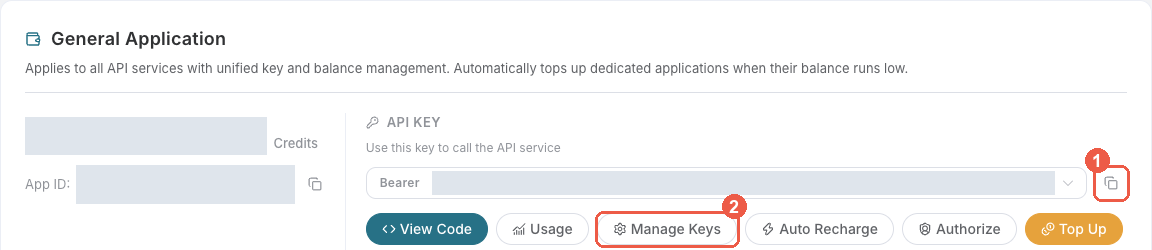
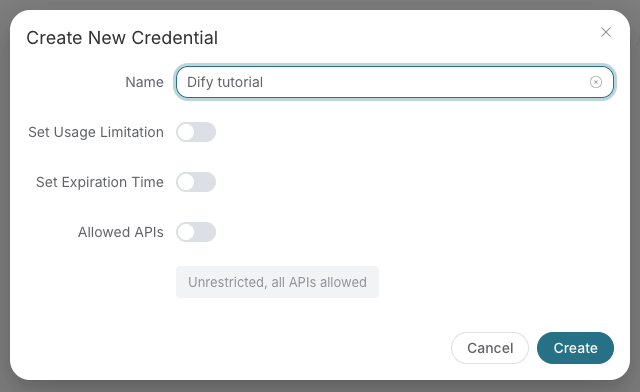
Save the key in the client's credential store or the environment variable shown below. Never put it in a prompt, shared workflow, screenshot, or Git commit. If authentication fails, check the full copied value, application/service access, expiration, usage limit, and balance before creating another key.
<!-- END TOKEN ONBOARDING -->A fixed Bearer header bypa
Truncated for display — read the full file on GitHub.
Related Skills
taste-skill
122.3kAgent skills that give coding agents taste: art direction, reference images and a browser check instead of generic AI pages
Agent-Reach
115.4kGive your AI agent eyes to see the entire internet. Read & search Twitter, Reddit, YouTube, GitHub, Bilibili, XiaoHongShu — one CLI, zero API fees.
hyperframes
91.5kOpen-source AI video editor: edit your own footage, or create and remake any video with Claude Code, Codex or the free Studio app. Write HTML, render MP4. By HeyGen.
ruflo
82.6k🌊 The original agent harness. Deploy intelligent multi-player swarms, coordinate autonomous workflows, and build conversational AI systems. Features adaptive memory, self-learning intelligence, federation, vector RAG integration, and native Claude Code / Codex / Hermes and many more Integrated

Languages
Trust signals
From repository metadata: license, adoption, age and documentation. Not a code audit — see the Safety scan above for what the skill file itself contains.