
Atn Modmail
ATN Modmail is an easy to use Discord Modmail bot! This is also a nice alternative to premade Modmail bots because of the customisable things that you can find! Read the README.md file to get started!
Install / Use
npx skills add ATN-Development/atn-modmailInstalls into whichever agent you are using.
README
Overview
ATN ModMail is an open source ModMail bot made by NotReallyEight. This modmail is completely customizable and a very easy to use bot. It doesn't require coding knowledge also except just configuring certain values.
Installation is also very easy. Configuring the bot with custom messages just requires basic variable assign knowledge.
The features are:
- Snippets
- Custom Emoji Reaction
- Customizable Open and Close Ticket Messages
- Ticket Transcripts
Prerequisites
When using the bot, you must have done the following:
- Installed Node.js on their official website
Installation
Configure the bot settings by making changes in config.example.ts and
snippets.example.ts. After configuring, change the file names to config.ts
and snippets.ts and then type in npm install and finally npm run startin terminal* where
location must be the bot directory.
If you still experience issues, feel free to join the Discord Server and ask for help.
If you find any bugs or issues in it, feel free to fork it and submit a PR or you could just create a Github Issue. Alternatively, you could also join the Discord Server
Common Errors
Authentication failed
If you are getting this error, you need to save the file using the shortcut
Ctrl + S. If you did not save the file, there will be a white ball at the
left/right of the filename at the top of the screen, as you can see from the
screenshot below. 
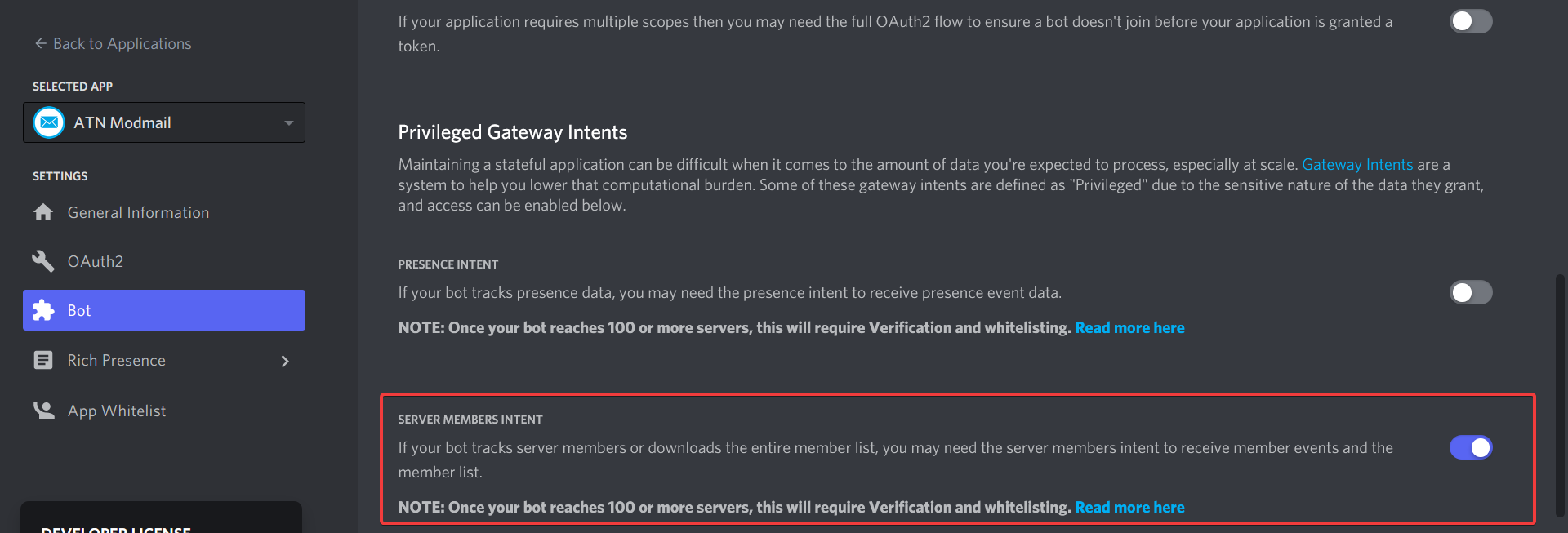
Disallowed intents specified
If you are getting this error, you need to head over to your
bot's application and click on
the Bot tab, from there you need to enable the Server Members Intent, as you
can see from the screenshot below.
FAQ
How can I use a default emoji in the config.ts file?
If you do not like custom emojis, and you want to use some default ones, you should type the emoji directly from your computer's keyboard through shortcuts or copy pasting using third party websites. (E.g.: Emojipedia)
You can see how it would look like with the ✔️ emoji for example:

Join the community
ATN Modmail is still being developed. This means, new features are yet to come. You are free to contribute to this project by submitting PR's
Join us on our Official Discord Server!
License
Released under the GNU GPL v3 license.
Notes
*To open the terminal in Visual Studio Code, you need to:
- Open Visual Studio Code, click on
Terminal, then, click onNew Terminal. In the popup that will show up, type in the command you want to run, as you can see from the example screenshot below.
Related Skills
node-connect
385.5kDiagnose OpenClaw Android, iOS, or macOS node pairing, QR/setup code, route, auth, and connection failures.
imsg
385.5kUse the imsg CLI from OpenClaw agents for iMessage/SMS DMs, groups, replies, reactions, polls, watching, and private-API actions.
blender-python-addon
40.5kBlender Python add-on rules for operators, panels, properties, registration, testing, and API-safe scripting
flutter-development-guidelines-cursorrules-prompt-file
40.5kCursor rules for Flutter development with MVVM architecture, Riverpod state management, Material widgets, and Dart style guidelines.
