
Npp 1 Dark
One Dark Syntax Theme for Notepad++
Install / Use
npx skills add 60ss/Npp-1-DarkInstalls into whichever agent you are using.
README
Npp-1-Dark
One Dark Syntax Theme for Notepad++
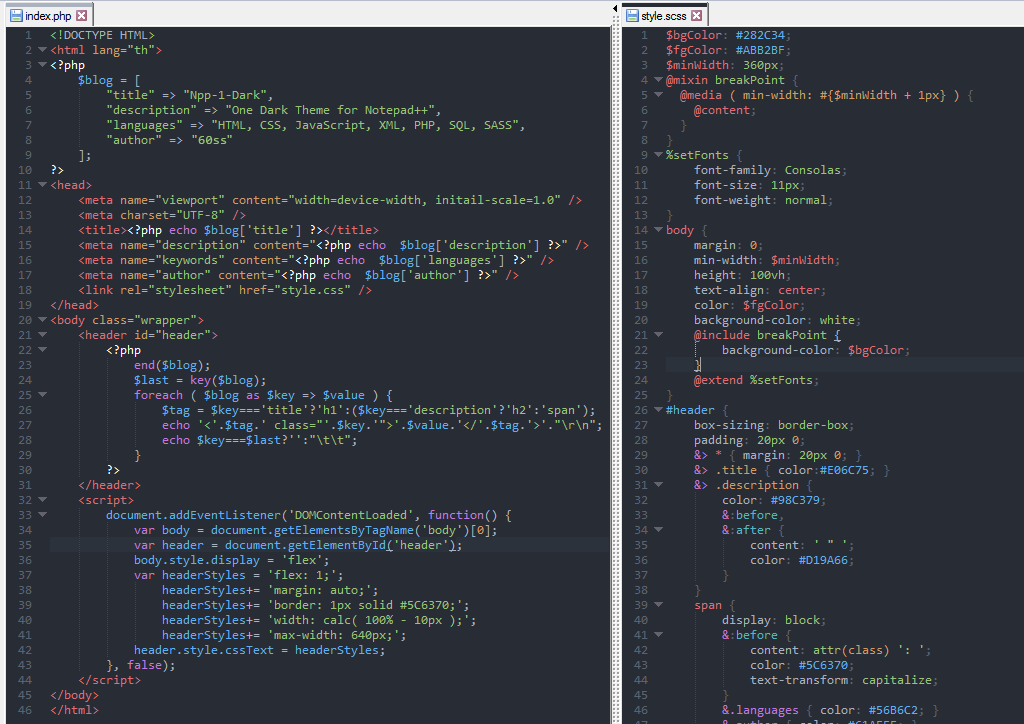
A close replica of the Atom
One Darksyntax theme inNotepad++.
Theme Installation:
- Download
Npp-1-Dark.xml. - Run
Notepad++As administrator. - Open
Setting -> Import -> Import style theme(s). - Choose
Npp-1-Dark.xml. - Open
Settings -> Style Configuratorand Select themeNpp-1-Dark. - Click
Save & Close.
Sass Syntax Highlighting Installation:
- Download
Npp-1-Dark-Sass.xml. - Open
Language -> Define your language.... - Click
Importand ChooseNpp-1-Dark-Sass.xml. - Click
Open. - Restart
Notepad++.
Related Skills
node-connect
385.5kDiagnose OpenClaw Android, iOS, or macOS node pairing, QR/setup code, route, auth, and connection failures.
blender-python-addon
40.5kBlender Python add-on rules for operators, panels, properties, registration, testing, and API-safe scripting
flutter-development-guidelines-cursorrules-prompt-file
40.5kCursor rules for Flutter development with MVVM architecture, Riverpod state management, Material widgets, and Dart style guidelines.
commit-push-pr
140.6kCommit, push, and open a PR
View on GitHub85/100

Security Score
Audited on Aug 7, 2026
No findings