
Nuqs
Type-safe search params state manager for React frameworks - Like useState, but stored in the URL query string.
Install / Use
/learn @47ng/NuqsREADME
nuqs




Type-safe search params state manager for React frameworks. Like useState, but stored in the URL query string.
Features
- 🔀 new: Supports Next.js (
appandpagesrouters), plain React (SPA), Remix, React Router, TanStack Router, and custom routers via adapters - 🧘♀️ Simple: the URL is the source of truth
- 🕰 Replace history or append to use the Back button to navigate state updates
- ⚡️ Built-in parsers for common state types (integer, float, boolean, Date, and more). Create your own parsers for custom types & pretty URLs
- ♊️ Related querystrings with
useQueryStates - 📡 Shallow mode by default for URL query updates, opt-in to notify server components
- 🗃 Server cache for type-safe searchParams access in nested server components
- ⌛️ Support for
useTransitionto get loading states on server updates
Documentation
Read the complete documentation at nuqs.dev.
Installation
pnpm add nuqs
yarn add nuqs
npm install nuqs
Adapters
You will need to wrap your React component tree with an adapter for your framework. (expand the appropriate section below)
<details><summary>▲ Next.js (app router)</summary>Supported Next.js versions:
>=14.2.0. For older versions, installnuqs@^1(which doesn't need this adapter code).
// src/app/layout.tsx
import { NuqsAdapter } from 'nuqs/adapters/next/app'
import { type ReactNode } from 'react'

export default function RootLayout({ children }: { children: ReactNode }) {
  return (
    <html>
      <body>
        <NuqsAdapter>{children}</NuqsAdapter>
      </body>
    </html>
  )
}
Supported Next.js versions:
>=14.2.0. For older versions, installnuqs@^1(which doesn't need this adapter code).
// src/pages/_app.tsx
import type { AppProps } from 'next/app'
import { NuqsAdapter } from 'nuqs/adapters/next/pages'

export default function MyApp({ Component, pageProps }: AppProps) {
  return (
    <NuqsAdapter>
      <Component {...pageProps} />
    </NuqsAdapter>
  )
}
Example: via Vite or create-react-app.
import { NuqsAdapter } from 'nuqs/adapters/react'

createRoot(document.getElementById('root')!).render(
  <NuqsAdapter>
    <App />
  </NuqsAdapter>
)
Supported Remix versions:
@remix-run/react@>=2
// app/root.tsx
import { NuqsAdapter } from 'nuqs/adapters/remix'

// ...

export default function App() {
  return (
    <NuqsAdapter>
      <Outlet />
    </NuqsAdapter>
  )
}
Supported React Router versions:
react-router-dom@^6
import { NuqsAdapter } from 'nuqs/adapters/react-router/v6'
import { createBrowserRouter, RouterProvider } from 'react-router-dom'
import App from './App'

const router = createBrowserRouter([
  {
    path: '/',
    element: <App />
  }
])

export function ReactRouter() {
  return (
    <NuqsAdapter>
      <RouterProvider router={router} />
    </NuqsAdapter>
  )
}
Supported React Router versions:
react-router@^7
// app/root.tsx
import { NuqsAdapter } from 'nuqs/adapters/react-router/v7'
import { Outlet } from 'react-router'

// ...

export default function App() {
  return (
    <NuqsAdapter>
      <Outlet />
    </NuqsAdapter>
  )
}
Supported TanStack Router versions:
@tanstack/react-router@^1Note: TanStack Router support is experimental and does not yet cover TanStack Start.
// src/routes/__root.tsx
import { NuqsAdapter } from 'nuqs/adapters/tanstack-router'
import { Outlet, createRootRoute } from '@tanstack/react-router'

export const Route = createRootRoute({
  component: () => (
    <>
      <NuqsAdapter>
        <Outlet />
      </NuqsAdapter>
    </>
  )
})
Usage
'use client' // Only works in client components

import { useQueryState } from 'nuqs'

export default () => {
  const [name, setName] = useQueryState('name')
  return (
    <>
      <h1>Hello, {name || 'anonymous visitor'}!</h1>
      <input value={name || ''} onChange={e => setName(e.target.value)} />
      <button onClick={() => setName(null)}>Clear</button>
    </>
  )
}
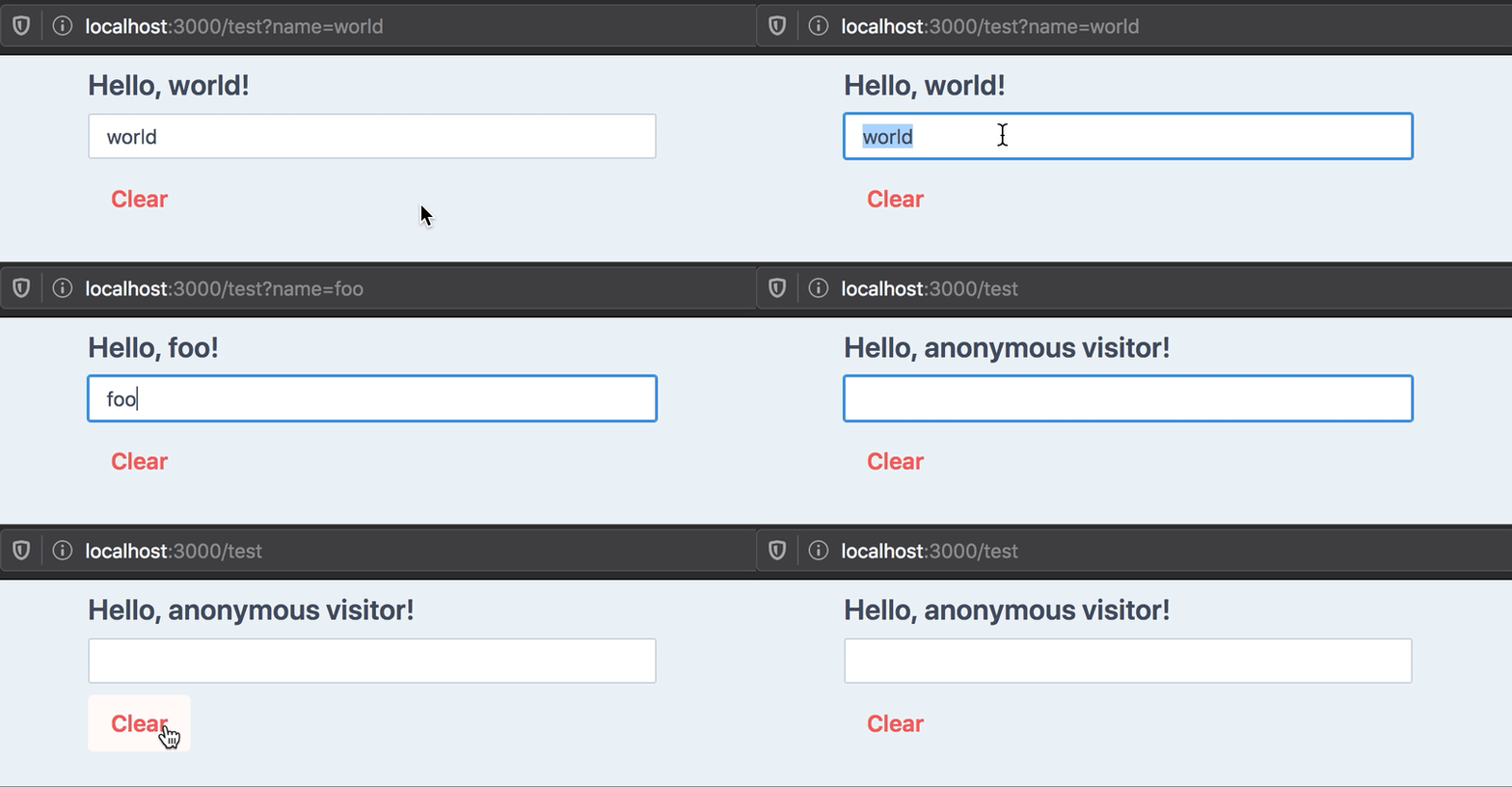
useQueryState takes one required argument: the key to use in the query string.
Like React.useState, it returns an array with the value present in the query
string as a string (or null if none was found), and a state updater function.
Example outputs for our hello world example:
| URL | name value | Notes |
| ------------ | ---------- | ----------------------------------------------------------------- |
| / | null | No name key in URL |
| /?name= | '' | Empty string |
| /?name=foo | 'foo' |
| /?name=2 | '2' | Always returns a string by default, see Parsing below |
Parsing
If your state type is not a string, you must pass a parsing function in the second argument object.
We provide parsers for common and more advanced object types:
import {
  parseAsString,
  parseAsInteger,
  parseAsFloat,
  parseAsBoolean,
  parseAsTimestamp,
  parseAsIsoDateTime,
  parseAsArrayOf,
  parseAsJson,
  parseAsStringEnum,
  parseAsStringLiteral,
  parseAsNumberLiteral
} from 'nuqs'

useQueryState('tag') // defaults to string
useQueryState('count', parseAsInteger)
useQueryState('brightness', parseAsFloat)
useQueryState('darkMode', parseAsBoolean)
useQueryState('after', parseAsTimestamp) // state is a Date
useQueryState('date', parseAsIsoDateTime) // state is a Date
useQueryState('array', parseAsArrayOf(parseAsInteger)) // state is number[]
useQueryState('json', parseAsJson<Point>()) // state is a Point

// Enums (string-based only)
enum Direction {
  up = 'UP',
  down = 'DOWN',
  left = 'LEFT',
  right = 'RIGHT'
}

const [direction, setDirection] = useQueryState(
  'direction',
  parseAsStringEnum<Direction>(Object.values(Direction)) // pass a list of allowed values
    .withDefault(Direction.up)
)

// Literals (string-based only)
const colors = ['red', 'green', 'blue'] as const

const [color, setColor] = useQueryState(
  'color',
  parseAsStringLiteral(colors) // pass a readonly list of allowed values
    .withDefault('red')
)

// Literals (number-based only)
const diceSides = [1, 2, 3, 4, 5, 6] as const

const [side, setSide] = useQueryState(
  'side',
  parseAsNumberLiteral(diceSides) // pass a readonly list of allowed values
    .withDefault(4)
)
You may pass a custom set of parse and serialize functions:
import { useQueryState } from 'nuqs'

export default () => {
  const [hex, setHex] = useQueryState('hex', {
    // TypeScript will automatically infer it's a number
    // based on what `parse` returns.
    parse: (query: string) => parseInt(query, 16),
    serialize: value => value.toString(16)
  })
}
Default value
When the query string is not present in the URL, the default behaviour is to
return null as state.
It can make state updating and UI rendering tedious. Take this example of a simple counter stored in the URL:
import { useQueryState, parseAsInteger } from 'nuqs'

export default () => {
  const [count, setCount] = useQueryState('count', parseAsInteger)
  return (
    <>
      <pre>count: {count}</pre>
      <button onClick={() => setCount(0)}>Reset</button>
      {/* handling null values in setCount is annoying: */}
      <button onClick={() => setCount(c => c ?? 0 + 1)}>+</button>
      <button onClick={() => setCount(c => c ?? 0 - 1)}>-</button>
      <button onClick={() => setCount(null)}>Clear</button>
    </>
  )
}
You can specify a default value to be returned in this case:
const [count, setCount] = useQueryState('count', parseAsInteger.withDefault(0))

const increment = () => setCount(c => c + 1) // c will never be null
const decrement = () => setCount(c => c - 1) // c will never be null
const clearCount = () => setCount(null) // Remove query from the URL
Note: the default value is internal to React, it will not be written to the URL.
Setting the state to null will remove the key in the query string and set the
state to the default value.
Options
History
By default, state updates are done by replacing the current history entry with the updated query when s
