
handover-mcp
MCP server, CLI, and Agent Skills for shared, versioned context across Claude Code, Codex, Cursor, Gemini CLI, humans, and AI agents
Install / Use
claude mcp add 44-pixels -- npx -y github:44-pixels/handover-mcpIf the server publishes to npm under a different name, use that package instead — check the repo README.
MCP Server
Model Context Protocol server
Quality Score
Category
Development & EngineeringSupported Platforms
Tags
Our assessment of handover-mcp
handover-mcp scores 83/100 on our quality scale, 3041st of 4,588 Development & Engineering skills we index.
Its MCP Server is 22 KB long, well organised into 23 sections with 13 code examples: a thorough specification that gives an agent plenty to work with.
It has 3 GitHub stars, so there is little community track record yet; judge it on its content.
Maintenance, license and trust
- The repository was last updated about 3 months ago, so handover-mcp is actively maintained.
- It is released under the MIT license, a permissive license that allows use, modification and commercial use with attribution.
- Its trust signals score 92/100, with 1 caution from licensing, adoption, age or documentation. These come from repository metadata, not a code audit — read the skill file before letting an agent act on it.
handover-mcp compared with similar skills
All 4 of these similar skills score higher than handover-mcp; compare them before choosing.
| Skill | Score | Stars | Updated | Format |
|---|---|---|---|---|
| handover-mcp (this skill)by 44-pixels | 83 | 3 | 3mo ago | MCP Server |
| taste-skillby Leonxlnx | 100 | 102.1k | today | CLAUDE.md |
| Agent-Reachby Panniantong | 100 | 101.9k | today | CLAUDE.md |
| headroomby headroomlabs-ai | 100 | 77.7k | today | CLAUDE.md |
| ai-job-searchby ai-job-search-dev | 100 | 65.0k | 4d ago | CLAUDE.md |
Frequently asked questions
- How do I install handover-mcp?
- Run
claude mcp add 44-pixels -- npx -y github:44-pixels/handover-mcp. The install tabs above show the steps for each supported agent. - Which AI agents does handover-mcp work with?
- It is written for Claude Code, Claude Desktop, Cursor, Gemini CLI and OpenAI Codex, as a MCP Server file. Other agents that read the same format can often use it too.
- Is handover-mcp safe to use?
- It is MIT-licensed and scores 92/100 on trust signals. Skills are instructions an agent will follow, so read the file before installing it and do not approve commands you do not understand.
- Is handover-mcp still maintained?
- The repository was last updated about 3 months ago, so handover-mcp is actively maintained.
Skill content
View source on GitHubHandover MCP
Move active work between Claude Code, Codex, Cursor, Gemini CLI, people, and service agents without losing decisions, files, history, or authorship.




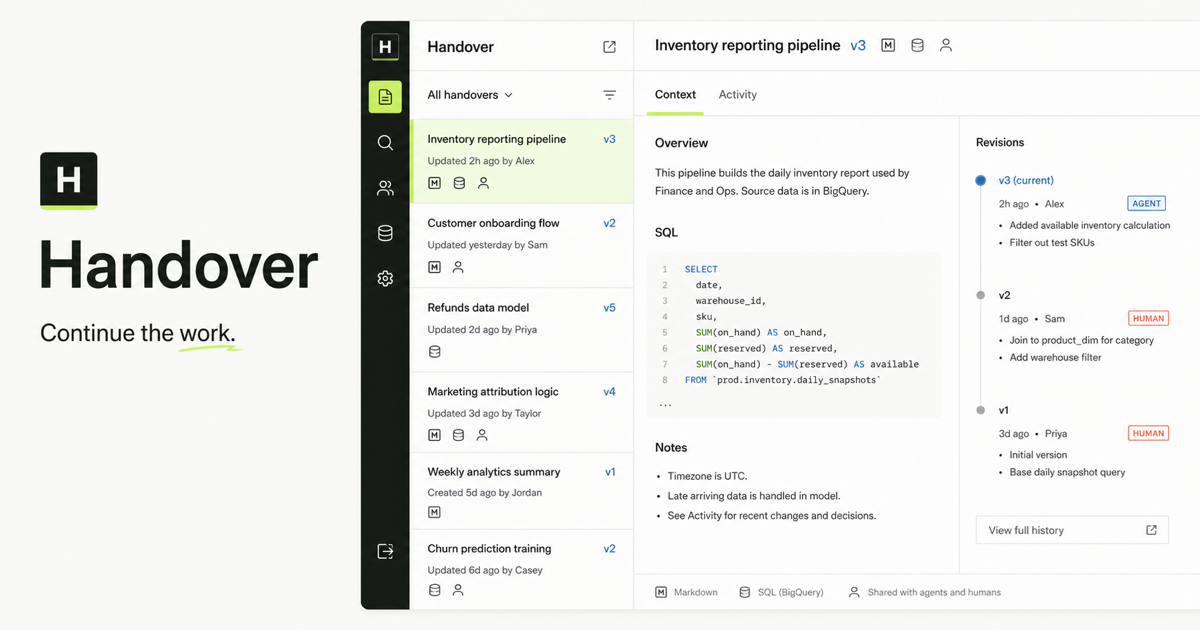
Handover provides shared, versioned context for humans and AI agents through a hosted Model Context Protocol server, a dependency-free CLI, and eight open Agent Skills. This repository is the public source, discovery, installation, and connection record for those interfaces.
Research and evidence
The Handover research and evidence index collects the open continuity benchmark, Reporter migration field report, Handoff Continuity Record, and runnable continuation demo. Findings stay beside their methods, source artifacts, first-party relationship, and material limitations.
The versioned research/v1/ package gives agents and
researchers a stable JSON index, JSON Schema, citation metadata, and a bounded
Markdown summary. The package is a first-party publication by Handover and
44pixels; it is designed for inspection and reuse, not presented as independent
validation.
- Human research index
- Agent-readable production index
- Versioned repository index
- Citation metadata
- Run and submit an independent benchmark result
See a complete handoff
The public continuation demo shows the same workflow from both sides: an interactive human view and an agent-readable record. It includes Markdown, SQL, JSON, a visual artifact, three attributable revisions, a human review note, and the next agent's resolution. No account is required.
- Interactive demo
- Continue the demo in your workspace
- Demo workflow and verification notes
- Agent-readable manifest
- Raw Markdown
- Raw SQL
- Evidence JSON
Build a private handoff prompt
The AI handoff prompt generator turns unfinished work into separate capture and receiver prompts without requiring an account. Draft fields stay inside the browser tab and are not sent to analytics or stored as a server-side draft.
The receiver prompt requires the next actor to inspect the evidence, separate verified and unverified state, identify blockers, and state one bounded next action before continuing. Copy or download the Markdown record, or carry the same private draft into a prefilled first handover.
Move from Claude Code to Codex
Codex's built-in import is the right first choice for a one-time move of supported Claude Code setup, projects, memories, and recent chats. Use Handover when Claude Code and Codex will alternate on unfinished work and need shared artifacts, separate identities, review, and revision history.
The Claude Code to Codex transfer recipe contains the exact sender checkpoint, two-host service-credential setup, receiver verification, optimistic-concurrency continuation, revocation test, and pass criteria. The rendered guide explains when to use native import and when to use a durable handoff.
Run the reviewed MCP handoff
The demo shows the finished record. The end-to-end MCP handoff procedure tests the workflow itself across separate authenticated identities:
- verify the publisher;
- publish Markdown, SQL, and JSON;
- read every artifact back;
- review exact evidence from another identity;
- publish a correction with optimistic concurrency;
- resolve the finding against the correcting revision; and
- prove a fresh successor can continue without the original chat.
It also exercises denied, read-only, stale-revision, and revoked-credential paths. Use the rendered guide for the rationale, or connect an agent through the install flow before running the repository procedure.
Use the AI agent handoff checklist
For a smaller local handoff, start with the Markdown checklist. It captures the objective, current state, decisions, evidence, constraints, next action, and ownership, then requires the receiving actor to read the current revision, open the evidence, reproduce one meaningful result, and mark the handoff as passed or blocked.
The rendered checklist and FAQ explains each verification step. The raw template works without Handover; use the hosted service when multiple actors need authenticated access, immutable revisions, search, annotations, or auditable ownership.
Test company AI context readiness
Before connecting company knowledge to several people and agents, use the company AI context readiness checklist. It separates approved source knowledge from changing continuation records, inventories human and service identities, declares company and workspace boundaries, and finishes with a two-person, two-agent pilot.
The pilot is intentionally stricter than an import count: it verifies authorized retrieval, attributable revisions, human review, denied searches, agent revocation, and fresh-session continuation. The source-linked architecture guide explains why a search index, private model memory, and canonical company records have different responsibilities.
Use the open handoff format
The Handoff Continuity Record is a platform-neutral JSON format for the state another human or AI agent needs to verify and continue work. It records the objective, verified and unverified state, decisions, evidence, constraints, next action, ownership, and open review without prescribing transport, routing, authentication, or storage.
The protocol/v1/ directory contains:
- a JSON Schema Draft 2020-12 contract;
- a valid inventory-reporting example;
- a dependency-free Node.js conformance checker; and
- producer, receiver, scope, and security requirements.
node protocol/v1/validate.mjs protocol/v1/example.json
MCP can expose the tools used to read and write the record. A2A or an orchestration framework can route it. Git or Handover can store it.
Connect
The canonical Streamable HTTP endpoint is:
https://handover.sh/api/mcp?profile=core
The recommended core profile exposes 17 tools for everyday identity, search,
retrieval, review, continuation, publishing, and portability workflows. Use
https://handover.sh/api/mcp?profile=native for all 27 first-party Handover
operations. The unparameterized https://handover.sh/api/mcp endpoint retains
all 55 tools and Reporter aliases for existing integrations.
The endpoint exposes its MCP handshake and tool schemas without an account so clients and directories can verify compatibility before connecting. Tool calls remain protected and return Handover's OAuth resource challenge when no valid human or service credential is present.
Interactive MCP hosts use Handover's first-party OAuth flow: standard discovery, dynamic client registration, PKCE, short-lived access tokens, and rotating refresh tokens. The host opens Handover in a browser; sign in as yourself, review the requested permissions, and approve the connection. Handover records your human identity on every attributable action.
Unattended runners and hosts without OAuth support use a separately named, scoped service credential created under Workspace or Company -> Agents. Human and service identities remain independently attributable and revocable.
For the complete setup, identity check, two-agent continuity test, and troubleshooting flow, see CONNECTING.md.
Codex
codex mcp add handover --url https://handover.sh/api/mcp?profile=core
codex mcp login handover
Claude Code
claude mcp add --transport http --scope user \
  handover https://handover.sh/api/mcp?profile=core
Gemini CLI
gemini mcp add --transport http --scope user \
  handover https://handover.sh/api/mcp?profile=core
Cursor
Add this to .cursor/mcp.json. Cursor discovers Handover's authorization
server and prompts for browser sign-in when the connection starts:
{
  "mcpServers": {
    "handover": {
      "url": "https://handover.sh/api/mcp?profile=core"
    }
  }
}
Cline
Open Cline's MCP wizard:
cline mcp install handover --transport http https://handover.sh/api/mcp?profile=core
Choose Remote (HTTP) and Static headers, then enter the scoped service
agent credential in Cline's private header prompt. The agent-readable
llms-install.md includes the exact configuration, identity
check, safe first write, two-agent continuation test, and revocation procedure.
Use the first-party Cline setup
page
for the complete Handover flow. Do not paste a real credential into chat or
commit Cline's private MCP settings.
Command-line client
The dependency-free Handover CLI supports the same durable workflow from a terminal:
npm install --global handover-sh
handover login
handover doctor
handover search "billing migration"
handover pull <slug-or-url> --out ./continued-work
handover publish ./report --title "Weekly report"
The published package source and metadata live in cli/. The audited
dire
Truncated for display — read the full file on GitHub.
Related Skills
taste-skill
102.1kAgent skills that give coding agents taste: art direction, reference images and a browser check instead of generic AI pages
Agent-Reach
101.9kGive your AI agent eyes to see the entire internet. Read & search Twitter, Reddit, YouTube, GitHub, Bilibili, XiaoHongShu — one CLI, zero API fees.
headroom
77.7kCompress tool outputs, logs, files, and RAG chunks before they reach the LLM. 20% fewer tokens for coding agents, 60-95% fewer tokens for JSON, same answers. Library, proxy, MCP server.
ai-job-search
65.0kThe job search that runs on your machine. AI job application framework built on Claude Code: evaluate postings, tailor CVs, write cover letters, prep interviews. Fork it and own it.

Languages
Trust signals
From repository metadata: license, adoption, age and documentation. Not a code audit — see the Safety scan above for what the skill file itself contains.