
Ci
Highly opionated Github Actions workflow builder for Common Lisp projects.
Install / Use
/learn @40ants/CiREADME
<a id="x-2840ANTS-CI-DOCS-2FINDEX-3A-40README-2040ANTS-DOC-2FLOCATIVES-3ASECTION-29"></a>
40Ants-CI - Github Workflow Generator
[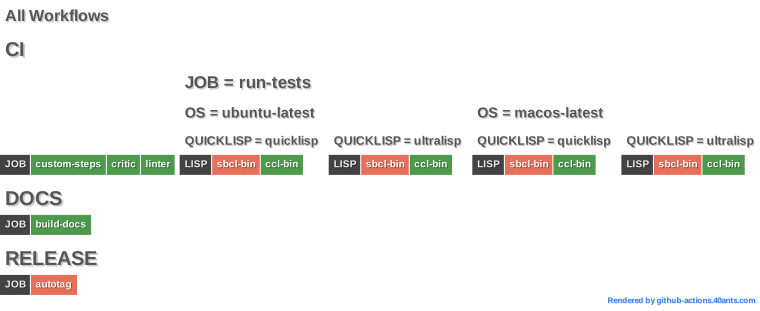 ][de0b]

This is a small utility, which can generate GitHub workflows for Common Lisp projects.
It generates workflow for running tests and building docs. These workflows
use [40ants/run-tests][8469] and [40ants/build-docs][b882]
actions and [SBLint][2f94] to check code for compilation errors.
<a id="40-ants-ci-asdf-system-details"></a>
40ANTS-CI ASDF System Details
- Description: A tool simplify continuous deployment for Common Lisp projects.
- Licence:
BSD - Author: Alexander Artemenko
- Homepage: [https://40ants.com/ci/][3f72]
- Source control: [GIT][e681]
- Depends on: [alexandria][8236], [serapeum][c41d], [str][ef7f], [yason][aba2]
<a id="x-2840ANTS-CI-DOCS-2FINDEX-3A-3A-40REASONS-2040ANTS-DOC-2FLOCATIVES-3ASECTION-29"></a>
Reasons to Use
- This system hides all entrails related to caching.
- Includes a few ready to use job types.
- Custom job types can be defined and distributed as separate
ASDFsystems. - You don't have to write
YAMLanymore!
<a id="x-2840ANTS-CI-DOCS-2FINDEX-3A-3A-40QUICKSTART-2040ANTS-DOC-2FLOCATIVES-3ASECTION-29"></a>
Quickstart
This system allows you to define workflows in the lisp code. The best way is to make these
definitions a part of your ASDF system. This way 40ants-ci ([1][900b] [2][b171]) will be able to
automatically understand for which system it builds a workflow.
Each workflow consists of jobs and each job is a number of steps.
There are three predefine types of jobs and you can create your own. Predefined jobs
allows to reuse steps in multiple CL libraries.
In next examples, I'll presume you are writing code in a file which is the part
of the package inferred ASDF system EXAMPLE/CI. A file should have the following header:
(defpackage #:example/ci
  (:use #:cl)
  (:import-from #:40ants-ci/workflow
                #:defworkflow)
  (:import-from #:40ants-ci/jobs/linter)
  (:import-from #:40ants-ci/jobs/run-tests)
  (:import-from #:40ants-ci/jobs/docs))
<a id="x-2840ANTS-CI-DOCS-2FINDEX-3A-3A-40JOB-TYPES-2040ANTS-DOC-2FLOCATIVES-3ASECTION-29"></a>
Job Types
<a id="x-2840ANTS-CI-DOCS-2FINDEX-3A-3A-40AUTOTAG-2040ANTS-DOC-2FLOCATIVES-3ASECTION-29"></a>
Autotag
This job is automates git tag placement on the commit where you have changed the ChangeLog.md.
This can be a useful to automate package deployment and releases. You update the changelog, a job pushes a new git tag and the next action triggers on this tag and build a release.
Or you if you publish your library at Quicklisp distribution, then you can change
it's source type to the latest-github-tag to provide more stable releases to your
users. This way you commits into master will be ignored until you change the changelog and
git tag will be pushed. Here is an [example][1cec] how to setup this kind of quicklisp project source.
(defworkflow release
  :on-push-to "master"
  :jobs ((40ants-ci/jobs/autotag:autotag)))
<a id="x-2840ANTS-CI-2FJOBS-2FAUTOTAG-3AAUTOTAG-20FUNCTION-29"></a>
function 40ants-ci/jobs/autotag:autotag &key (filename *default-filename*) (regex *default-regex*) (tag-prefix *default-tag-prefix*) (token-pattern *default-token-pattern*) env
Creates a job which will run autotagger to create a new git tag for release.
<a id="x-2840ANTS-CI-2FJOBS-2FAUTOTAG-3AAUTOTAG-20CLASS-29"></a>
class 40ants-ci/jobs/autotag:autotag (job)
This type of the job created a git tag when finds a new tag in specified file.
<a id="x-2840ANTS-CI-DOCS-2FINDEX-3A-3A-40LINTER-2040ANTS-DOC-2FLOCATIVES-3ASECTION-29"></a>
Linter
The simplest job type is linter. It loads a
(defworkflow linter
  :on-pull-request t
  :jobs ((40ants-ci/jobs/linter:linter)))
When you'll hit C-c C-c on this definition,
it will generate .github/workflows/linter.yml with following content:
{
  "name": "LINTER",
  "on": {
    "pull_request": null
  },
  "jobs": {
    "linter": {
      "runs-on": "ubuntu-latest",
      "env": {
        "OS": "ubuntu-latest",
        "QUICKLISP_DIST": "quicklisp",
        "LISP": "sbcl-bin"
      },
      "steps": [
        {
          "name": "Checkout Code",
          "uses": "actions/checkout@v4"
        },
        {
          "name": "Setup Common Lisp Environment",
          "uses": "40ants/setup-lisp@v4",
          "with": {
            "asdf-system": "example"
          }
        },
        {
          "name": "Install SBLint",
          "run": "qlot exec ros install cxxxr/sblint",
          "shell": "bash"
        },
        {
          "name": "Run Linter",
          "run": "qlot exec sblint example.asd",
          "shell": "bash"
        }
      ]
    }
  }
}
Here you can see, a few steps in the job:
- Checkout the code.
- Install Roswell & Qlot using [40ants/setup-lisp][8de1] action.
- Install [
SBLint][2f94]. - Run linter for
example.asd.
Another interesting thing is that this workflow automatically uses ubuntu-latest OS,
Quicklisp and sbcl-bin Lisp implementation. Later I'll show you how to redefine these settings.
<a id="x-2840ANTS-CI-2FJOBS-2FLINTER-3ALINTER-20CLASS-29"></a>
class 40ants-ci/jobs/linter:linter (lisp-job)
<a id="x-2840ANTS-CI-DOCS-2FINDEX-3A-3A-40CRITIC-2040ANTS-DOC-2FLOCATIVES-3ASECTION-29"></a>
Critic
This job is similar to linter, but instead of SBLint it runs
[Lisp Critic][2100].
Lisp Critic is a program which advices how to make you Common Lisp code more idiomatic, readable and performant. Also, sometimes it might catch logical errors in the code.
Here is how you can add this job type in your workflow:
(defworkflow ci
  :on-pull-request t
  :jobs ((40ants-ci/jobs/critic:critic)))
Also, you might combine this job together with others, for example, with linter:
(defworkflow ci
  :on-pull-request t
  :jobs ((40ants-ci/jobs/linter:linter)
         (40ants-ci/jobs/critic:critic)))
and they will be executed in parallel. See docs on [40ants-ci/jobs/critic:critic][484a] function
to learn about supported arguments.
<a id="x-2840ANTS-CI-DOCS-2FINDEX-3A-3A-40RUN-TESTS-2040ANTS-DOC-2FLOCATIVES-3ASECTION-29"></a>
Running Tests
Another interesting job type is 40ants-ci/jobs/run-tests:run-tests ([1][e35d] [2][6cb7]).
When using this job type, make sure, your system
runs tests on (ASDF:TEST-SYSTEM :system-name) call
and signals error if something went wrong.
(defworkflow ci
  :on-push-to "master"
  :by-cron "0 10 * * 1"
  :on-pull-request t
  :jobs ((40ants-ci/jobs/run-tests:run-tests
          :coverage t)))
Here I've added a few options to the workflow:
by-cron- sets a schedule.on-push-to- defines a branch or branches to track.
It will generate .github/workflows/ci.yml with following content:
{
  "name": "CI",
  "on": {
    "push": {
      "branches": [
        "master"
      ]
    },
    "pull_request": null,
    "schedule": [
      {
        "cron": "0 10 * * 1"
      }
    ]
  },
  "jobs": {

    "run-tests": {
      "runs-on": "ubuntu-latest",
      "env": {
        "OS": "ubuntu-latest",
        "QUICKLISP_DIST": "quicklisp",
        "LISP": "sbcl-bin"
      },
      "steps": [
        {
          "name": "Checkout Code",
          "uses": "actions/checkout@v4"
        },
        {
          "name": "Setup Common Lisp Environment",
          "uses": "40ants/setup-lisp@v4",
          "with": {
            "asdf-system": "example"
          }
        },
        {
          "name": "Run Tests",
          "uses": "40ants/run-tests@v2",
          "with": {
            "asdf-system": "example",
            "coveralls-token": "${{ secrets.github_token }}"
          }
        }
      ]
    }
  }
}
The result is similar to the workflow generated for Linter, but uses [40ants/setup-lisp][59d7] action at the final step.
Also, I've passed an option :coverage t to the job. Thus coverage
report will be uploaded to [Coveralls.io][b60c] automatically.
<a id="x-2840ANTS-CI-DOCS-2FINDEX-3A-3A-40MATRIX-2040ANTS-DOC-2FLOCATIVES-3ASECTION-29"></a>
Defining a test Matrix
Lisp has many implementations and can be used on multiple platforms. Thus
it is a good idea to test our software on many combinations of OS and lisp
implementations. Workflow generator makes this very easy.
Here is an example of workflow definition with three dimentional matrix.
It not only tests a library under different lisps and OS, but also checks
if it works with the latest Quicklisp and Ultralisp distributions:
(defworkflow ci
  :on-pull-request t
  :jobs ((run-tests
          :os ("ubuntu-latest"
               "macos-latest")
          :quicklisp ("quicklisp"
                      "ultralisp")
          :lisp ("sbcl-bin"
                 "ccl-bin"
                 "allegro"
                 "clisp"
                 "cmucl")
          :exclude (;; Seems allegro is does not support 64bit OSX.
                    ;; Unable to install it using Roswell:
                    ;; alisp is not executable. Missing 32bit glibc?
                    (:os "macos-latest" :lisp "allegro")))))
<a id="x-2840ANTS-CI-DOCS-2FINDEX-3A-3A-40MULTIPLE-JOBS-2040ANTS-DOC-2FLOCATIVES-3ASECTION-29"></a>
Multiple jobs
Besides a build matrix, you might specify a multiple jobs of the same type, but with different parameters:
(defworkflow ci
  :on-push-to "master"
  :on-pull-request t
  :jobs ((run-tests
          :lisp "sbcl-bin")
         (run-tests
          :lisp "ccl-bin")
         (run-tests
          :lisp "allegro")))
This will generate a workflow with three jobs: "run-tests", "run-tests-2" and "run-tests-3".
Meaningful names might be specified as well:
(defworkflow ci
  :on-push-to "master"
  :
Related Skills
node-connect
351.4kDiagnose OpenClaw node connection and pairing failures for Android, iOS, and macOS companion apps
frontend-design
110.7kCreate distinctive, production-grade frontend interfaces with high design quality. Use this skill when the user asks to build web components, pages, or applications. Generates creative, polished code that avoids generic AI aesthetics.
openai-whisper-api
351.4kTranscribe audio via OpenAI Audio Transcriptions API (Whisper).
qqbot-media
351.4kQQBot 富媒体收发能力。使用 <qqmedia> 标签,系统根据文件扩展名自动识别类型(图片/语音/视频/文件)。
