
FmRESTor.js
Leverage the FileMaker® 17, 18 & 19 Data API with ease!
Install / Use
/learn @24u/FmRESTor.jsREADME
Leverage the FileMaker® 17, 18 & 19 Data API with ease!
fmRESTor.js is a JavaScript library developed to seamlessly interact with databases and custom apps hosted on a FileMaker Server via the new powerful FileMaker Data API from within a JavaScript code. Forget about learning FileMaker Data API in detail, just create a new object, passing it necessary parameters to connect to the database, and use our easy to understand methods to access or modify your data. fmRESTor.js will take care of authentication, exceptions, and even session preservation in order for your code to be a well-behaving client for the FileMaker Data API without you having to worry about these technical details.
We have created fmRESTor.js as a second flavor of fmRESTor, firstly created for PHP, to make it easier and faster to interact with FileMaker databases from within custom web apps we did not want to rely on intermediate PHP scripts hosted on a web server. Being able to easily interact with FileMaker Data API from within JavaScript makes the interaction much faster and suitable for projects like complex user interfaces used within a Web Viewer on a FileMaker layout.
Keep in mind that credentials to access your database are exposed to the user with this approach, because JavaScript variables can be easily explored by a power user. So make sure to use credentials with highly limited rights, or consider using the PHP version of fmRESTor instead.
We at 24U believe that the whole FileMaker developers community will benefit from the FileMaker Platform not only having new powerful RESTful API, but also developers using the API nicely and efficiently, therefore we decided to make our library available as Open Source, under the GNU LGPLv3 license.
We will greatly appreciate your contributions, although we cannot provide free support for the library. You may, however, hire us to help you with your projects for money by purchasing our services at https://www.24uSoftware.com/fmRESTor or by utilizing our custom development services, available at https://www.24uSoftware.com/custom-apps.
Features
- One object class conveniently handles everything
- Automatically generates authentication token
- Re-uses existing token to avoid unnecessary additional connections
- Automatically re-generates expired token
- Handles exceptions and provides meaningful error results
Requirements
- Modern Web Browser
- FileMaker Server 17, 18 or 19
Important ! - How make fmRESTor.js work with FileMaker Server 19 !
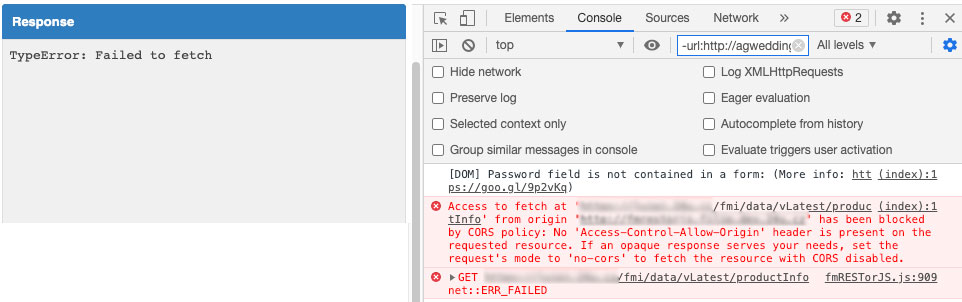
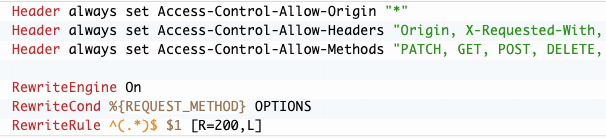
To access the FileMaker Data API directly from JavaScript running in a client browser you’ll need to set additional headers to support CORS (Cross Origin Request Sharing). Otherwise your requests may fail with CORS policy error:
On macOS and Linux you can do that by modifying Apache configuration:
On Windows you can find instructions in the IIS CORS module Configuration Reference.
You can learn more about CORS and FileMaker Data API from this great article by Steve Winter.
Usage ( with npm )
npm i @24u/fmrestor
Usage ( without npm )
Include downloaded library file to your project and create new class instance.
<!DOCTYPE html>
<html lang="en">
<head>
    <meta charset="UTF-8">
    <title>Your Project ( Basic )</title>
</head>
<body>

<script src="lib/fmRESTorJS.js"></script>
<script>
let fm = new fmRESTorJS(host, name, layout, user, password, options, fmExternalSource);

<!-- YOUR METHOD HERE (examples in DEMO) -->

</script>
</body>
</html>
Instance parameters:
Parameter | Type | Mandatory |Description ------------- | ------------- | ------------- | ------------- host | string | yes | Hostname or IP address where FileMaker database is hosted name | string | yes | FileMaker database name layout | string | yes | Database layout name to work on user | string | yes | User login to database password | string | yes | User password to database options | array | optional | Additional library configuration fmExternalSource | array | optional | Providing additional data sources, i.ec. if you use a separation model and the current layout needs to access data from external data sources.
Options parameters:
Name | Type | Mandatory | Default value | Description ------------- | ------------- | ------------- | ------------- | ------------- token.name | string | optional | "fm-api-token" | Custom localStorage/Cookie name token.expiration | number | optional | 14 | Expiration time in minutes. fmRESTor automatically handles database login and saves token with its expiration time (into $_SESSION var) during first request. If expired, fmRESTor automatically reconnects to database on next request. token.saveTo | string | optional | "localStorage" | Place where is store FileMaker token. Options "Cookie" / "localStorage"
Example:
let options = {
    token: {
        name: "test-api2",
        saveTo: "cookie",
        expiration: 14
    }
};

let fmExternalSource = [
    {
        database: "fmRESTorEXTERNAL",
        username: "external",
        password: "external123456"
    }
];

let fm = new fmRESTorJS("127.0.0.1", "fmRESTor", "php_user", "api", "api123456", options, fmExternalSource);
Methods
logout
Supported FileMaker Server version: 17, 18, 19
Close current session in the FileMaker database.
/**
 * @param successCallback
 * @param errorCallback
 * @returns {*}
 */
logout(successCallback, errorCallback)
fm.logout((requestSuccess) => {
    // logout - SUCCESS
}, (requestError) => {
    // logout - ERROR
});
getProductInformation:
Supported FileMaker Server version: 18, 19
Returns useful information about the FileMaker Server you're connecting to, such as version or data & time formats.
/**
 * @param successCallback
 * @param errorCallback
 */
getProductInformation(successCallback, errorCallback)
fm.login((loginSuccess) => {
    // login - SUCCESS
	fm.getProductInformation((requestSuccess) => {
		// getProductInformation - SUCCESS
	}, (requestError) => {
		// getProductInformation - ERROR
	});
}, (loginError) => {
    // login - ERROR
});
{
  "response": {
    "productInfo": {
      "name": "FileMaker Data API Engine",
      "buildDate": "07/05/2019",
      "version": "18.0.2.217",
      "dateFormat": "MM/dd/yyyy",
      "timeFormat": "HH:mm:ss",
      "timeStampFormat": "MM/dd/yyyy HH:mm:ss"
    }
  },
  "messages": [
    {
      "code": "0",
      "message": "OK"
    }
  ]
}
FileMaker 18 Data API Guide - Get Product Information
getDatabaseNames:
Supported FileMaker Server version: 18, 19
Returns array of names of all databases hosted and enabled for access via FileMaker Data API.
/**
 *
 * @param successCallback
 * @param errorCallback
 */
getDatabaseNames(successCallback, errorCallback)
fm.login((loginSuccess) => {
    // login - SUCCESS
	fm.getDatabaseNames((requestSuccess) => {
		// getDatabaseNames - SUCCESS
	}, (requestError) => {
		// getDatabaseNames - ERROR
	});
}, (loginError) => {
    // login - ERROR
});
{
  "response": {
    "databases": [
      {
        "name": "fmRESTor"
      }
    ]
  },
  "messages": [
    {
      "code": "0",
      "message": "OK"
    }
  ]
}
FileMaker 18 Data API Guide - Get Database Names
getScriptNames:
Supported FileMaker Server version: 18, 19
Returns array of names of all available scripts for given database.
/**
 * @param successCallback
 * @param errorCallback
 */
getScriptNames(successCallback, errorCallback)
fm.login((loginSuccess) => {
    // login - SUCCESS
    fm.getScriptNames((requestSuccess) => {
        // getScriptNames - SUCCESS
    }, (requestError) => {
        // getScriptNames - ERROR
    });
}, (loginError) => {
    // login - ERROR
});
{
  "response": {
    "scripts": [
      {
        "name": "Log request",
        "isFolder": false
      }
    ]
  },
  "messages": [
    {
      "code": "0",
      "message": "OK"
    }
  ]
}
FileMaker 18 Data API Guide - Get Script Names
getLayoutNames:
Supported FileMaker Server version: 18, 19
Returns array of names of all available layouts for given database.
/**
 * @param successCallback
 * @param errorCallback
 */
getLayoutNames(successCallback, errorCallback)
fm.login((loginSuccess) => {
    // login - SUCCESS
	fm.getLayoutNames((requestSuccess) => {
		// getLayoutNames - SUCCESS
	}, (requestError) => {
		// getLayoutNames - ERROR
	});
}, (loginError) => {
    // login - ERROR
});
{
  "response": {
    "layouts": [
      {
        "name": "php",
        "isFolder": true,
        "folderLayoutNames": [
          {
            "name": "php_user"
          },
          {
            "name": "php_licence"
          }
        ]
      },
      {
        "name": "scpt",
        "isFolder": true,
