
TweetFeed
TweetFeed collects Indicators of Compromise (IOCs) shared by the infosec community at Twitter. Here you will find malicious URLs, domains, IPs, and SHA256/MD5 hashes.
Install / Use
npx skills add 0xDanielLopez/TweetFeedInstalls into whichever agent you are using.
README
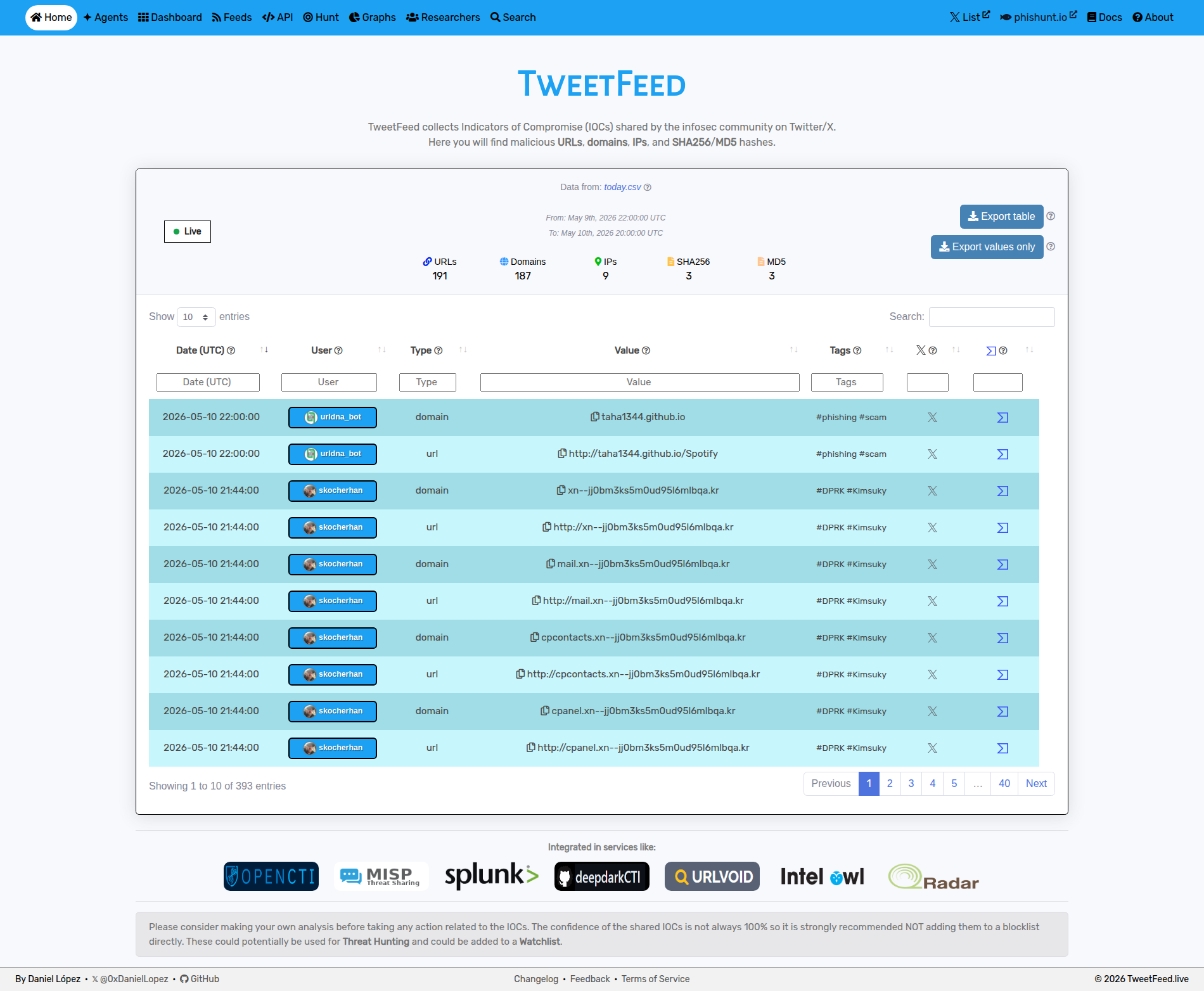
</div>
☰ Content
- Data collected
- Programmatic access
- Some statistics
- How it works
- Use TweetFeed in your stack
- Agent-ready surface
- License
- Author
- Disclaimer
The counters below (timestamp, per-type totals, tag count, top tags, top reporters) are regenerated by the pipeline every 15 minutes. Hand-written sections are stable.
:heart: Support the project
If you like the project, please consider:
- Giving it a star :star:
- Invite to a coffee :coffee:
:page_facing_up: Data collected
<div align="center"> <h3>CSV feeds</h3> <table> <thead> </thead> <tbody> <tr> <th colspan=4>2026-08-08 04:30:21 (UTC)</th> </tr> <tr> <th>Today</th> <th>Last 7 days</th> <th>Last 30 days</th> <th>Last 365 days</th> </tr> <tr> <td>:clipboard: <a href="https://github.com/0xDanielLopez/TweetFeed/blob/master/today.csv">Today</a> (<a href="https://raw.githubusercontent.com/0xDanielLopez/TweetFeed/master/today.csv">raw</a>)</td> <td>:clipboard: <a href="https://github.com/0xDanielLopez/TweetFeed/blob/master/week.csv">Week</a> (<a href="https://raw.githubusercontent.com/0xDanielLopez/TweetFeed/master/week.csv">raw</a>)</td> <td>:clipboard: <a href="https://github.com/0xDanielLopez/TweetFeed/blob/master/month.csv">Month</a> (<a href="https://raw.githubusercontent.com/0xDanielLopez/TweetFeed/master/month.csv">raw</a>)</td> <td>:clipboard: <a href="https://github.com/0xDanielLopez/TweetFeed/blob/master/year.csv">Year</a> (<a href="https://raw.githubusercontent.com/0xDanielLopez/TweetFeed/master/year.csv">raw</a>)</td> </tr> </tbody> </table> <h3>Other formats</h3> <table> <thead> <tr> <th>Format</th> <th>URL</th> <th>Notes</th> </tr> </thead> <tbody> <tr> <td><b>RSS 2.0</b></td> <td><a href="https://raw.githubusercontent.com/0xDanielLopez/TweetFeed/master/rss.xml">rss.xml</a></td> <td>Today's IOCs (regenerated every 15 min)</td> </tr> <tr> <td><b>MISP</b></td> <td><a href="https://raw.githubusercontent.com/0xDanielLopez/TweetFeed/master/misp/manifest.json">misp/manifest.json</a></td> <td>One event per day, 365 days of history. Add as a feed in MISP via <i>Sync Actions → Feeds → Add</i>, using the directory <code>https://tweetfeed.live/misp</code> - MISP appends <code>/manifest.json</code> itself.</td> </tr> <tr> <td><b>MISP hash cache</b></td> <td><a href="https://tweetfeed.live/misp/hashes.csv">misp/hashes.csv</a></td> <td><code>md5(value),event-uuid</code> pairs for MISP's <i>Cache feed</i> correlation, last 31 days</td> </tr> <tr> <td><b>STIX 2.1</b></td> <td><a href="https://raw.githubusercontent.com/0xDanielLopez/TweetFeed/master/stix/manifest.json">stix/manifest.json</a></td> <td>Bundles for <a href="https://tweetfeed.live/stix/today.json">today</a> / <a href="https://tweetfeed.live/stix/week.json">week</a> / <a href="https://tweetfeed.live/stix/month.json">month</a>. No year bundle on purpose - it would land north of 80 MB, close to GitHub's push limit. Use the diff endpoint below to stay in sync instead.</td> </tr> <tr> <td><b>TAXII 2.1</b></td> <td><a href="https://api.tweetfeed.live/taxii2/">api.tweetfeed.live/taxii2/</a></td> <td>Read-only TAXII server, no auth. One collection, <code>b7dc78af-1d12-5059-898c-3f0e77636204</code> (<i>TweetFeed IOCs, rolling 31 days</i>). Point any TAXII 2.1 client at the discovery URL.</td> </tr> <tr> <td><b>Blocklists</b></td> <td><a href="https://api.tweetfeed.live/v1/blocklist/domains.txt">v1/blocklist/<format></a></td> <td>Rolling 30 days, ready to drop into a resolver: <code>domains.txt</code>, <code>hosts.txt</code>, <code>adguard.txt</code>, <code>rpz.txt</code>, <code>dnsmasq.txt</code>, <code>ips.txt</code>, <code>urls.txt</code>. See <a href="#mag-use-tweetfeed-in-your-stack">DNS / network blocking</a> below.</td> </tr> <tr> <td><b>Scoped RSS</b></td> <td><code>rss/{tag,type,user}/<name>.xml</code></td> <td>Narrower feeds than the firehose: <a href="https://tweetfeed.live/rss/tag/phishing.xml">per tag</a> (any tag active in the last 7 days), <a href="https://tweetfeed.live/rss/type/url.xml">per IOC type</a> (always all five), and per reporter handle.</td> </tr> </tbody> </table> </div> <div align="center"> <h3>Output example</h3> <p><b>CSV schema</b></p> <pre><code>date, user, type, value, tags, tweet_url</code></pre><sub><b>No header row</b> - the first line is already data, so do not set <code>ignoreFirstRecord</code> / <code>skip_header</code> or you will drop a real IOC. Dates are UTC, <code>tags</code> is space-separated. Live sample: <a href="https://github.com/0xDanielLopez/TweetFeed/blob/master/today.csv">today.csv</a></sub>
</div>:gear: Programmatic access
<div align="center"> <table> <thead> <tr> <th>Surface</th> <th>URL</th> <th>Use case</th> </tr> </thead> <tbody> <tr> <td><b>REST API</b></td> <td><a href="https://api.tweetfeed.live/v1">api.tweetfeed.live</a></td> <td>JSON, no auth, CORS enabled. <code>/v1/{today,week,month,year}[/filter][/filter]</code> where a filter is an IOC type, a tag, or an <code>@handle</code>. Order does not matter: <code>/v1/today/url/phishing</code> and <code>/v1/today/phishing/url</code> are the same query.</td> </tr> <tr> <td><b>Incremental sync</b></td> <td><code>/v1/since/<ISO8601></code></td> <td>Only what landed after a timestamp, same filter syntax. Poll this instead of re-downloading <code>year.csv</code>. Returns <code>410</code> past the 365-day horizon.</td> </tr> <tr> <td><b>Single-IOC lookup</b></td> <td><code>/v1/ioc?value=<ioc></code></td> <td>Exact match across the full 365-day window, plus AI context, related infrastructure and network metadata when available. Backs <a href="https://tweetfeed.live/search/">tweetfeed.live/search/</a>.</td> </tr> <tr> <td><b>Campaigns / trends / counts</b></td> <td><code>/v1/{campaigns,trends,counts}</code></td> <td><a href="https://api.tweetfeed.live/v1/campaigns">Campaign clusters</a> from the last 7 days, <a href="https://api.tweetfeed.live/v1/trends">31-day trend series</a> (movers, TLDs, novelty), and <a href="https://api.tweetfeed.live/v1/counts">raw per-window counters</a>.</td> </tr> <tr> <td><b>MCP server</b></td> <td><a href="https://mcp.tweetfeed.live">mcp.tweetfeed.live</a></td> <td>JSON-RPC 2.0 endpoint exposing 10 tools (<code>query_iocs</code>, <code>check_url</code>, <code>check_ip</code>, <code>check_hash</code>, <code>list_recent_iocs</code>, <code>get_tag_info</code>, <code>get_trending</code>, <code>enrich_ioc</code>, <code>get_campaigns</code>, <code>get_trends</code>) for Claude / AI agents</td> </tr> </tbody> </table>Full request/response shapes live in the <a href="https://tweetfeed.live/openapi.yaml">OpenAPI spec</a>; see <a href="https://tweetfeed.live/agents/">tweetfeed.live/agents/</a> for the copy-paste MCP config and full tool reference.
</div>:bar_chart: Some statistics
<div align="center"> <h3>Types</h3>| Type | Today | Week | Month | Year | | :--- | :---: | :---: | :---: | :---: | | :link: URLs | 1 | 919 | 6458 | 54710 | | :globe_with_meridians: Domains | 0 | 768 | 5545 | 41839 | | :triangular_flag_on_post: IPs | 2 | 219 | 866 | 10703 | | :1234: SHA256 | 0 | 136 | 522 | 2513 | | :1234: MD5 | 1 | 91 | 258 | 2548 |
</div><div align="center"> <h3>Top 10 tags <sub>(by year activity, refreshed every 15 min)</sub></h3> <!-- TAG_TABLE_START -->
| Tag | Today | Week | Month | Year | | :--- | :---: | :---: | :---: | :---: | | #phishing | 0 | 782 | 6024 | 38638 | | #Kimsuky | 0 | 0 | 2082 | 15035 | | #DPRK | 0 | 2 | 2081 | 13432 | | #C2 | 0 | 48 | 412 | 11802 | | #scam | 0 | 6 | 144 | 5869 | | #CobaltStrike | 0 | 0 | 5 | 2753 | | #malware | 0 | 100 | 515 | 2736 | | #APT | 0 | 55 | 118 | 1678 | | #Interactsh | 0 | 0 | 0 | 1408 | | #Remcos | 0 | 0 | 85 | 1008 |
<!-- TAG_TABLE_END -->These are the busiest 10 of <!-- TAG_COUNT_START -->93<!-- TAG_COUNT_END --> tags being matched. Every one of them is queryable through the API and has its own RSS feed; the highest-volume ones also get a curated landing page at [tweetfeed
Related Skills
mcp
Use the `mcp_perplexity-ask_perplexity_search` tools to answer questions. You should use this instead of the `web_search` tool because it is a lot more accurate.
practical-power-systems-synthesis
This skill enables synthesis in the domain of power-systems (engineering). It represents research-level-level expertise and is designed for production use in research, industry, and educational contexts. Use this skill when you need to perform synthesis operations related to power-systems.
semi-supervised-optogenetics-testing
This skill enables testing in the domain of optogenetics (neuroscience). It represents intermediate-level expertise and is designed for production use in research, industry, and educational contexts. Use this skill when you need to perform testing operations related to optogenetics.
data-mining-interpretation-fundamental
This skill enables interpretation in the domain of data-mining (data-science). It represents fundamental-level expertise and is designed for production use in research, industry, and educational contexts. Use this skill when you need to perform interpretation operations related to data-mining.

Security Score
Audited on Aug 8, 2026