
usagetrim
Local CLI and MCP server for compacting test and build output, with retrieval from a redacted local cache.
Install / Use
claude mcp add 00200200 -- npx -y github:00200200/usagetrimIf the server publishes to npm under a different name, use that package instead — check the repo README.
MCP Server
Model Context Protocol server
Quality Score
Category
AI & Machine LearningSupported Platforms
Our assessment of usagetrim
usagetrim scores 84/100 on our quality scale, 632nd of 950 AI & Machine Learning skills we index.
Its MCP Server is 13 KB long, well organised into 14 sections with 8 code examples: a thorough specification that gives an agent plenty to work with.
It has 43 GitHub stars, so there is little community track record yet; judge it on its content.
Maintenance, license and trust
- The repository was last updated 3 days ago, so usagetrim is actively maintained.
- Our last check on 2026-09-25 found the source still online.
- It is released under the MIT license, a permissive license that allows use, modification and commercial use with attribution.
- Its trust signals score 97/100, with no cautions. These come from repository metadata, not a code audit — read the skill file before letting an agent act on it.
Safety scan
No issues foundOur scan of the whole file found no instruction hijacking, hidden characters, credential access, data exfiltration or destructive commands. An AI review of the same text found nothing harmful.
AI review by kimi-k2.7-code on 2026-10-02. Automated pattern scan on 2026-10-02. It catches known dangerous patterns, not every risk — read a skill before letting an agent act on it.
usagetrim compared with similar skills
All 4 of these similar skills score higher than usagetrim; compare them before choosing.
| Skill | Score | Stars | Updated | Format |
|---|---|---|---|---|
| usagetrim (this skill)by 00200200 | 84 | 43 | 3d ago | MCP Server |
| claude-memby thedotmack | 100 | 117.9k | today | CLAUDE.md |
| Agent-Reachby Panniantong | 100 | 112.7k | 9d ago | CLAUDE.md |
| Understand-Anythingby Egonex-AI | 100 | 93.0k | 2d ago | CLAUDE.md |
| rufloby ruvnet | 100 | 82.0k | today | CLAUDE.md |
Frequently asked questions
- How do I install usagetrim?
- Run
claude mcp add 00200200 -- npx -y github:00200200/usagetrim. The install tabs above show the steps for each supported agent. - Which AI agents does usagetrim work with?
- It is written for Claude Code, Claude Desktop, Cursor and OpenAI Codex, as a MCP Server file. Other agents that read the same format can often use it too.
- Is usagetrim safe to use?
- Our scan of the whole file found no instruction hijacking, hidden characters, credential access, data exfiltration or destructive commands. An AI review of the same text found nothing harmful. It is MIT-licensed and scores 97/100 on trust signals. Skills are instructions an agent will follow, so read the file before installing it and do not approve commands you do not understand.
- Is usagetrim still maintained?
- The repository was last updated 3 days ago, so usagetrim is actively maintained.
Skill content
View source on GitHubInstall
Requires Python 3.11+ and uv (pipx works too).
uv tool install git+https://github.com/00200200/usagetrim
usagetrim demo
Try without installing: uvx --from git+https://github.com/00200200/usagetrim usagetrim demo.
Add it inside your app
| App | Install |
|---|---|
| Claude Code | /plugin marketplace add 00200200/usagetrim, then /plugin install usagetrim@usagetrim — MCP tools, Bash and MCP output hooks, Haiku agents |
| Claude Desktop | Customize → Plugins → add the marketplace 00200200/usagetrim, or double-click usagetrim-<version>.mcpb from Releases (Settings → Extensions) |
| Codex app & CLI | codex plugin marketplace add 00200200/usagetrim, then codex plugin add usagetrim@usagetrim (or pick it under Plugins in the app) |
| Cursor, Windsurf | usagetrim install --cursor or usagetrim install --windsurf |
Plugins run the pinned release wheel through uvx, so they need uv on PATH. The .mcpb extension installs its own copy through Claude Desktop.
verbose tool text → keep the failure → recover the rest by reference
See it cut
usagetrim demo is offline — no model calls. Failures stay; originals recover exactly.
| Fixture | Tokens |
| --- | ---: |
| docker build BuildKit | 18,360 → 107 (99.4%) |
| go test + goroutine dump | 3,281 → 64 (98.0%) |
| terraform plan refresh/read | 6,409 → 276 (95.7%) |
| cargo test + backtrace | 3,795 → 185 (95.1%) |
| pytest noisy (xdist + I/O) | 5,111 → 349 (93.2%) |
| kubectl describe pod | 8,127 → 595 (92.7%) |
| pytest recovery demo | 1,562 → 174 (88.9%) |
| vitest / eslint / tsc | up to 98.8% / 79% |
Local o200k_base estimate — not billing, quality, or subscription-limit claims. Full matrix: usagetrim demo --json.
usagetrim run -- pytest -v
usagetrim run -- docker build -t app .
usagetrim run -- cargo test
usagetrim run -- go test ./...
usagetrim run -- kubectl describe pod api-7d8f9c-xk2m9
usagetrim run -- terraform plan
usagetrim run -- npx eslint . --format codeframe
What you get
- Compact other MCP servers, losslessly. The Claude Code hook rewrites results from other MCP servers: uniform JSON rows become TSV with the keys once,
{"result": "…"}wrappers lose their escaping, and indentation goes. Every value and type survives, and prompt-injection boundaries such as Supabase's<untrusted-data-…>stay verbatim. Measured below. - Spend Haiku, not Opus, on reading. The plugin adds
scout(read-only search) andrunner(tests and builds, failures only) agents on Haiku, so the main model gets conclusions instead of files and logs.usagetrim install --cheap-exploremoves Claude Code's built-in Explore, which now inherits the main model, back to Haiku./output-style usagetrim:leantrims reply preambles and recaps. - Cut noise, keep the failure. Specialized filters for pytest, Docker, cargo, go, vitest, eslint, tsc, mypy, pyright, kubectl, terraform/tofu plan|apply|destroy, GitHub Actions / GitLab CI log folding (
gh run view --log-failed,glab ci trace),uv sync/uv add, git diff, ruff… - Session dedup + spill. Same
runoutput or identicalcat/ MCPusagetrim_readview within ~15 minutes → short cache ref. Payloads over ~20 KiB → file + preview (USAGETRIM_SPILL_BYTES). - Recover by reference. Omitted text stays in a local CCR cache:
usagetrim retrieve tc_… - Measure it.
usagetrim gain/ MCPusagetrim_gain— per-tool-family savings and passthrough candidates (local estimates, not account quotas). - Desktop-ready. MCP for Claude Code / Codex / Cursor / Claude Desktop; Prepare-for-chat clipboard flow; optional macOS pet.
usagetrim gain                 # summary + by tool family + passthrough tips
usagetrim gain --history       # same tables + recent Raw→Compact / Saved rows
usagetrim gain --passthrough   # near-zero cuts only (specializer candidates)
usagetrim prepare --file draft.txt
Measured on real sessions
14 days of the maintainer's Claude Code transcripts, replayed offline through the same functions the hook runs. Token counts are local o200k_base estimates, not billing.
| Tool results | Count | Tokens before → after | Cut |
|---|---:|---:|---:|
| All third-party MCP results | 11,058 | 7.17M → 5.85M | 18.3% |
| Supabase execute_sql | 6,571 | 4.97M → 4.03M | 18.9% |
| Google Search Console analytics | 223 | 702k → 434k | 38.2% |
| Vercel list_deployments | 43 | 250k → 210k | 16.1% |
All 3,144 SQL results rewritten as TSV decoded back to the original rows (reproduce on your own transcripts: uv run python scripts/replay_mcp_transcripts.py). Browser and page-text tools return prose and were left alone. Bash output in the same sessions was mostly ad-hoc scripts, where the filters saved under 1%. Test and build logs are where the Bash filters pay off, so results depend on what your tools print.
How it fits
UsageTrim is not a chat interceptor. It sits on the tool path (CLI wrapper, MCP, Prepare-for-chat) so agents still see failures — just without the noise.
| Approach | What UsageTrim does instead |
| --- | --- |
| Blind head/tail truncation | Specialized cutters keep the failure signal; rest recovers via usagetrim retrieve |
| Rewrite the whole chat stream | MCP + prepare only — Desktop cannot rewrite model turns |
| Opaque “saved tokens” badges | usagetrim gain shows local Raw→Compact by tool family (not billing quotas) |
Same CCR idea as peers (compress → cache → retrieve). Differentiation is specialized cutters, session dedup, spill-to-file, and Desktop/MCP install paths — not a claim that we beat RTK/snip/headroom on every workload.
Connect your agent
Desktop & Coding profiles: 9–11 essential tools instead of 16 — about 36–38% smaller tool schemas in local o200k_base measurements (3,414 → 2,183 / 2,102). Not a per-turn usage guarantee.
# One-command installer for Codex & Claude Desktop
usagetrim install --codex            # configures ~/.codex/config.toml
usagetrim install --claude-desktop   # configures Claude Desktop MCP
usagetrim install --mcpb             # Extension manifest for one-click packaging
usagetrim install --all              # configures all at once
For Claude Code CLI:
claude mcp add --scope user usagetrim -- usagetrim mcp --profile coding
# or, without installing first:
claude mcp add --scope user usagetrim -- uvx --from git+https://github.com/00200200/usagetrim usagetrim mcp
Manual MCP configuration for Claude Desktop, Cursor, Codex, Windsurf:
{
  "mcpServers": {
    "usagetrim": {
      "command": "/absolute/path/to/usagetrim",
      "args": ["mcp", "--profile", "desktop"]
    }
  }
}
Path: command -v usagetrim. Use --profile full for every tool, --profile coding for core terminal tools, or --profile desktop for chat apps. Client setup →
# Prepare messy logs or stack traces with prompt-cache prefix stabilization:
usagetrim prepare --desktop -f error.log

# Initialize or optimize lean, cache-aligned instructions (CLAUDE.md / AGENTS.md):
usagetrim rules --init --client claude        # writes lean CLAUDE.md (~120 tokens)
usagetrim rules --init --client codex         # writes lean AGENTS.md (~120 tokens)
usagetrim rules --optimize --write -f CLAUDE.md # strips filler, aligns prompt caching
Desktop companion
Mint robot on your Mac — draggable pet or menu-bar mode. Local measurements, task memory, optional account-limit readings. English UI. No extra AI calls.
<p align="center"> <img src="https://raw.githubusercontent.com/00200200/usagetrim/main/assets/macos-pet.png" width="640" alt="UsageTrim macOS pet with example five-hour balances: Codex 68% left, Claude 42% left."> </p>Example balances are remaining allowance — not savings caused by UsageTrim.
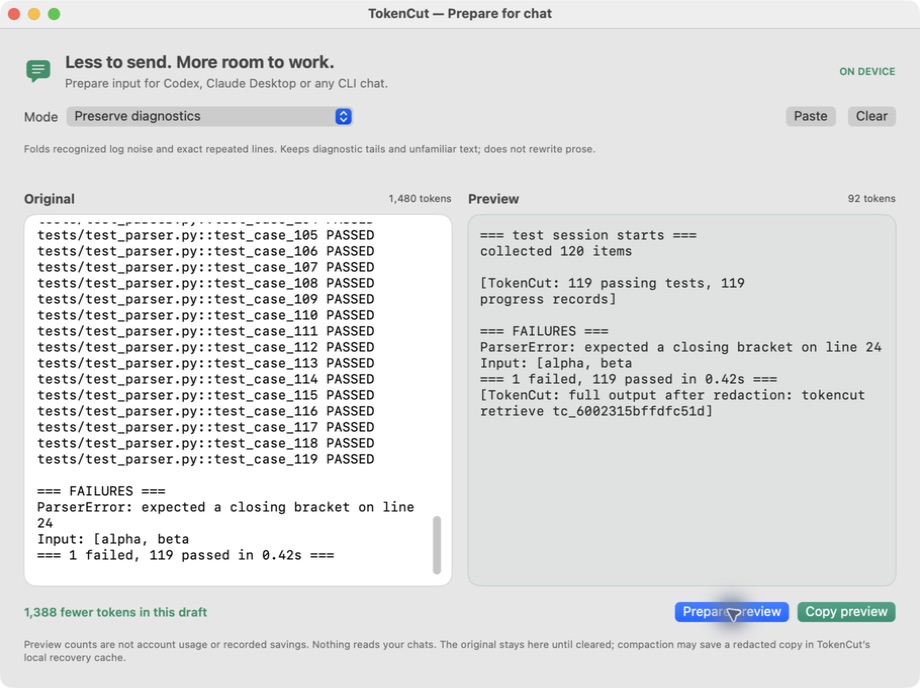
<p align="center"> <img src="https://raw.githubusercontent.com/00200200/usagetrim/main/assets/macos-conversation.png" width="720" alt="Prepare for chat window comparing an authored conversation with a local preview"> </p>Prepare for chat — paste a log, preview the cut, copy into Codex / Claude Desktop. Log prep →
macOS 13+ · ad-hoc signed, not notarized. CLI and MCP work without the pet. Build →
Roadmap
Ideas from the strongest tools in this space, adopted only with a measurement behind them:
- Ranked repo map (Aider-style PageRank over the symbol graph) fitted to a token budget.
- LSP-backed references and rename (Serena-style), falling back to the ast-grep index.
- Lossless log templating (Drain-style) for dev-server, Docker and CI logs.
- A paired A/B h
Truncated for display — read the full file on GitHub.
Related Skills
claude-mem
117.9kPersistent Context Across Sessions for Every Agent – Captures everything your agent does during sessions, compresses it with AI, and injects relevant context back into future sessions. Works with Claude Code, OpenClaw, Codex, Gemini, Hermes, Copilot, OpenCode + More
Agent-Reach
112.7kGive your AI agent eyes to see the entire internet. Read & search Twitter, Reddit, YouTube, GitHub, Bilibili, XiaoHongShu — one CLI, zero API fees.
Understand-Anything
93.0kGraphs that teach > graphs that impress. Turn any code into an interactive knowledge graph you can explore, search, and ask questions about. Works with Claude Code, Codex, Cursor, Copilot, Gemini CLI, and more.
ruflo
82.0k🌊 The original agent harness. Deploy intelligent multi-player swarms, coordinate autonomous workflows, and build conversational AI systems. Features adaptive memory, self-learning intelligence, federation, vector RAG integration, and native Claude Code / Codex / Hermes and many more Integrated

Languages
Trust signals
From repository metadata: license, adoption, age and documentation. Not a code audit — see the Safety scan above for what the skill file itself contains.